There is an unfamiliar IP address in your access logs. You paste it into Claude and ask the obvious question: where is this, and is it a VPN? Until recently the best you could get back was a confident guess, which is the worst kind of wrong answer, because it looks exactly like a right one. With the ipstack MCP server connected, the assistant stops guessing and goes and looks.
The ipstack MCP server connects AI assistants such as Claude, Cursor, and ChatGPT to ipstack’s real-time IP geolocation API through the Model Context Protocol (MCP). Once configured, the assistant can look up any IPv4 or IPv6 address and receive location, timezone, currency, ASN, and threat intelligence data as structured tool results. It uses your existing ipstack API key, and MCP usage is billed against your normal ipstack plan with no additional charge.
Key Takeaways
- The ipstack MCP server gives AI assistants live IP geolocation through four tools: Standard Lookup, Bulk Lookup (up to 50 IPs), Threat Intelligence, and ASN and Connection Data.
- It works in Claude Desktop, Cursor, VS Code Copilot, Windsurf, Cline, and ChatGPT.
- You can use the hosted server at mcp.apilayer.com/mcp or run it locally with npx @apilayer/mcp-server.
- Every lookup returns 100+ data fields covering 2M+ locations and 200K+ cities, over IPv4 and IPv6.
- MCP usage costs nothing beyond your existing ipstack plan, and a free API key needs no credit card.
MCP in 60 Seconds
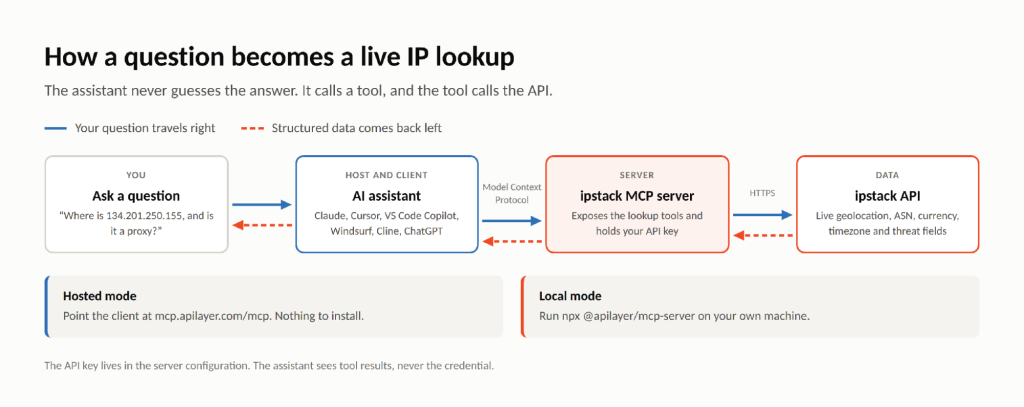
The Model Context Protocol is an open standard for letting AI applications call external tools and data sources in a uniform way. Three roles do the work. The host is the application you actually type into, such as Claude Desktop or Cursor. The client is the connector living inside it. The server is the piece that exposes tools, which in this case means ipstack’s lookups.
Why this matters for IP addresses specifically: a language model cannot know where an address is located. Not because the model is weak, but because the answer keeps changing. IP assignments move daily, and anything a model absorbed during training was true on a date that has since passed. The only correct answer is a live lookup at the moment you ask, which is exactly what an IP geolocation API is for. MCP is the plumbing that gets that lookup into the conversation instead of leaving you to switch tabs.
What the ipstack MCP Server Actually Does
Four tools show up in the assistant once the server is connected. You never call them by name; you ask a question in plain English and the assistant works out which one it needs.
Tool | What it does | Typical use |
|---|---|---|
Standard Lookup | Full 100+ field lookup of one IPv4 or IPv6 address | “Where is this IP and who owns it?” |
Bulk Lookup | Up to 50 IP addresses in a single request | Triage a log excerpt or alert batch |
Threat Intelligence | Flags proxies, VPNs, Tor exit nodes, and known threats | Fraud review, security triage |
ASN and Connection Data | ISP, carrier, ASN, and connection type | Spot hosting providers and scrapers |
Here is the shape of it in practice. Ask this:
Look up 134.201.250.155 and tell me the city, timezone, and whether it is a proxy.
And the assistant comes back with something built from this, abridged here from the full 100+ field response:
What makes this useful is not any single field. It is that one lookup answers several unrelated questions at once, depending on which part of the response you care about.

					{
  "ip": "134.201.250.155",
  "type": "ipv4",
  "city": "Los Angeles",
  "region_name": "California",
  "country_name": "United States",
  "zip": "90013",
  "latitude": 34.0453,
  "longitude": -118.2413,
  "time_zone": { "id": "America/Los_Angeles" },
  "currency": { "code": "USD", "symbol": "$" },
  "connection": { "asn": 25876, "isp": "Los Angeles Department of Water and Power" },
  "security": { "is_proxy": false, "is_tor": false, "threat_level": "low" }
}
What makes this useful is not any single field. It is that one lookup answers several unrelated questions at once, depending on which part of the response you care about.
The same response, read four different ways.
ipstack MCP Server at a Glance
For anyone scanning rather than reading, the specification in one table.
Spec | Detail |
|---|---|
Tools exposed | 4: Standard Lookup, Bulk Lookup (50 IPs max), Threat Intelligence, ASN and Connection Data |
Supported clients | Claude Desktop, Cursor, VS Code Copilot, Windsurf, Cline, ChatGPT |
Deployment | Hosted: https://mcp.apilayer.com/mcp; Local: npx @apilayer/mcp-server |
Authentication | Bearer ${env:APILAYER_MCP_TOKEN} environment variable |
Data coverage | 100+ fields per lookup, 2M+ locations, 200K+ cities, IPv4 and IPv6 |
Uptime | 99.9% infrastructure uptime, 256-bit SSL |
Extra cost | None; MCP calls bill against the normal ipstack plan |
How It Works Under the Hood
There are two ways to run it, documented on the official ipstack MCP server page. Hosted mode points your AI client at ipstack’s remote MCP endpoint and needs nothing installed. Local mode runs the server on your own machine with a single npx command. Either way your API key lives in the server configuration, and the assistant only ever sees tool results, never the credential itself.
Hosted configuration, which is the one most people want:
					{
  "mcpServers": {
    "apilayer": {
      "url": "https://mcp.apilayer.com/mcp",
      "headers": {
        "Authorization": Bearer ${env:APILAYER_MCP_TOKEN}"EN}"
      }
    }
  }
}
Local alternative, if you would rather the server ran on your own machine:
npx @apilayer/mcp-server
The path a question travels is short, and worth seeing once.
What You Can Ask Once It Is Connected
Five prompts that cover most of what people actually do with it, with a note on what happens behind each.
- “Look up 134.201.250.155 and tell me the city, timezone, and whether it is a proxy.” A single lookup with a threat check.
- “Here are 20 IPs from my access log. Group them by country and ISP and flag any VPNs or Tor exit nodes.” One Bulk Lookup call triages the whole list.
- “What currency and timezone should my checkout page show for a visitor coming from 134.201.250.155?” Answered from the currency and timezone fields: USD and America/Los_Angeles.
- “Which ASN and ISP does this IP belong to, and is it a hosting provider or a residential connection?” Scraper and bot identification from ASN and connection type.
- “Compare these two IPs: where is each located, and which one looks riskier?” Two lookups plus the security flags, summarised side by side.
The second one is the prompt that tends to convert sceptics. Pasting twenty addresses into a chat and getting them grouped, resolved and flagged in one turn replaces a spreadsheet and about fifteen minutes.
ipstack MCP Server vs Calling the REST API Directly
These are different tools for different moments, and the comparison is less about capability than about who is doing the calling.
MCP server | REST API | |
|---|---|---|
Best for | Interactive triage, agent workflows, exploration | Production application code paths |
Integration effort | One JSON block, no code | HTTP client or SDK code |
Who calls it | The AI assistant, when you ask | Your application, on every request |
Output | Structured tool results summarized in chat | Raw JSON your code parses |
Key and billing | Same ipstack key and plan | Same ipstack key and plan |
It is not either or: teams use the MCP server to explore and debug, and the REST API in production, on the same key and the same plan.
Get Started in Five Minutes
Three steps stand between you and your first lookup. Grab a free ipstack API key, which needs no credit card. Paste the config block above into your AI client. Then ask your first question, and watch the assistant reach for a tool instead of its own memory.
The next article in this series walks through the setup for every supported client, step by step.
Frequently asked questions
Does ipstack have an MCP server?
Yes. ipstack offers an official MCP server that connects AI assistants such as Claude Desktop, Cursor, VS Code Copilot, Windsurf, Cline, and ChatGPT to its IP geolocation API. It runs as a hosted endpoint at mcp.apilayer.com/mcp or locally via npx @apilayer/mcp-server, and it uses your existing ipstack API key at no extra cost.
How do I connect Claude to an IP geolocation API?
Add the ipstack MCP server to Claude Desktop’s configuration file. Paste a short JSON block pointing at https://mcp.apilayer.com/mcp with your API token, restart Claude, and the lookup tools appear automatically. From then on you can ask Claude to geolocate any IPv4 or IPv6 address in plain English.
Does the ipstack MCP server cost extra?
No. MCP requests are billed against your normal ipstack plan, exactly like REST API calls. There is no separate MCP subscription or per tool fee. A free ipstack API key, available without a credit card, is enough to connect an assistant and start making lookups.
Which AI assistants support the ipstack MCP server?
The ipstack MCP server works with Claude Desktop, Cursor, VS Code Copilot, Windsurf, Cline, and ChatGPT. Any other client or agent framework that speaks the Model Context Protocol can also connect to the hosted endpoint at mcp.apilayer.com/mcp using a Bearer ${env:APILAYER_MCP_TOKEN} token.
Is ipstack safe to use in production?
Yes. ipstack runs on 99.9% uptime infrastructure with 256-bit SSL, sources its data through ISP partnerships, and is used by companies including Microsoft, Airbnb, and Samsung. In MCP setups the API key stays server side in your configuration, so the assistant never sees the raw credential.
Try ipstack free
IP-to-location, ASN, ISP, time zone and threat data from one endpoint. Get a key and make your first call in under a minute.

Karam Alsalhani
All articles by Karam →