An address shows up in your logs. It hit your login endpoint a few hundred times in a minute, and now you have to decide whether to block it, throttle it, or write to somebody about it. All you have is four numbers.
A WHOIS IP lookup turns those four numbers into a name. It asks the registry that handed out the address for the organization on file, the block that address belongs to, and a contact for reporting the traffic.
WHOIS is the public record of who holds which internet resources, and a WHOIS IP lookup is one query against it. Registries keep that record open so network operators can reach each other, which is why you can read the contact details for any address without an account or an API key.
This guide reads a real record field by field, starting with Google’s 8.8.8.8, where the field that should hold the network number sits empty. You will see which parts to trust, which ones get misread, and how RDAP and one API call return the owner and ASN without writing a parser for five registries.
What a WHOIS IP lookup returns
Run it against Google’s public DNS resolver:
whois 8.8.8.8
Output, trimmed of the registry’s terms-of-use comments:
					NetRange:       8.8.8.0 - 8.8.8.255
CIDR:           8.8.8.0/24
NetName:        GOGL
NetHandle:      NET-8-8-8-0-2
NetType:        Direct Allocation
OriginAS:
Organization:   Google LLC (GOGL)
RegDate:        2023-12-28
Updated:        2023-12-28
Ref:            https://rdap.arin.net/registry/ip/8.8.8.0

OrgName:        Google LLC
OrgId:          GOGL
Address:        1600 Amphitheatre Parkway
City:           Mountain View
StateProv:      CA
PostalCode:     94043
Country:        US

OrgAbuseHandle: ABUSE5250-ARIN
OrgAbuseName:   Abuse
OrgAbusePhone:  +1-650-253-0000
OrgAbuseEmail:  network-abuse@google.com
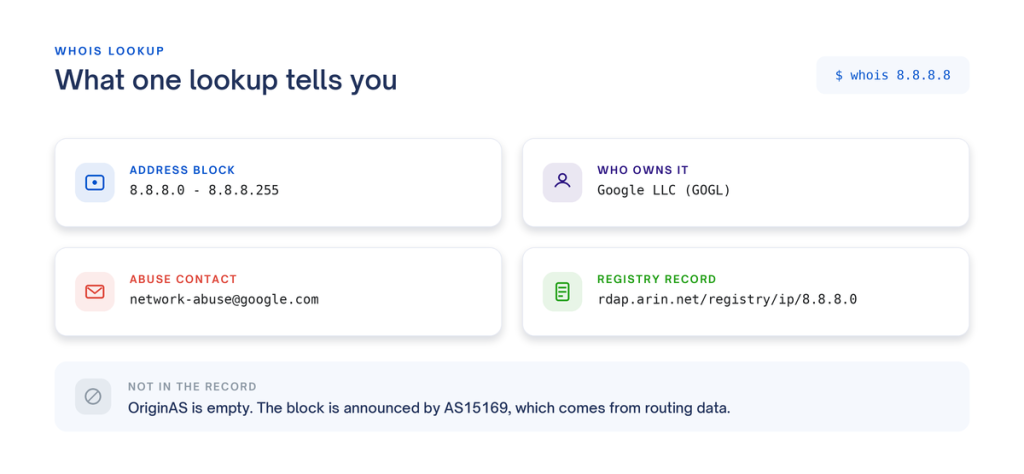
Four fields carry most of the value here. NetRange gives you the block of addresses the record covers. Organization names the company it was issued to. OrgAbuseEmail is where reports go. Ref points at the authoritative copy of the record. The rest is supporting detail.
No whois client installed, or port 43 blocked? Container images and corporate networks block it routinely. ARIN serves the same record over HTTPS:
curl -s https://whois.arin.net/rest/ip/8.8.8.8/pft.txt
What a WHOIS IP lookup will not tell you
WHOIS is a registration database. The record tells you who was allocated a block of addresses. Read it as a statement about who is behind that address today and you will draw the wrong conclusion, which is the most common mistake in IP WHOIS work.
Four things it leaves out.
The person actually using the address. Providers subdivide their blocks and hand pieces to customers. A record naming a hosting company is accurate about the company and silent about whoever is running the server on that address.
A physical location. The street address belongs to the organization’s corporate office. Google’s record says Mountain View, California. The machines answering 8.8.8.8 sit in data centers around the world. Location comes from geolocation data, built a different way from a different source.
The ASN, reliably. Look at OriginAS in the record above. It is empty. That field is optional, and plenty of registrants leave it unset. Meanwhile 8.8.8.0/24 is announced to the global routing table by AS15169, which belongs to Google. Registration data and routing data live in separate systems, and WHOIS holds the registration side.
Domain ownership. An IP lookup queries a regional internet registry. A domain lookup queries a domain registry. Both speak the same protocol, and they read from different databases.
How to read the fields
Working down the record:
- NetRange and CIDR are the same block written two ways. Registration happens at the block level, so a lookup on 8.8.8.44 returns the record you already saw for 8.8.8.8.
- NetName and NetHandle are registry identifiers. Quote NetHandle in a support ticket, since it stays stable.
- NetType tells you how the block was handed out. Direct Allocation means it came from the registry to this organization. Reallocated or Reassigned means it came down from an upstream provider, which tells you the operator you want sits one layer below the name on the record.
- Organization and OrgName are the holder of the block.
- RegDate and Updated. Updated earns more of your attention. A record nobody has touched in a decade suggests the contact details have drifted since.
- Ref links to the authoritative record, these days as an RDAP URL.
- OrgAbuseEmail receives abuse reports. On this record it reads network-abuse@google.com.
Now run the same command against an address in Europe:
whois 193.0.6.139
					inetnum:        193.0.0.0 - 193.0.7.255
netname:        RIPE-NCC
descr:          RIPE Network Coordination Centre
org:            ORG-RIEN1-RIPE
country:        NL
admin-c:        MDIR-RIPE
tech-c:         OPS4-RIPE
status:         ASSIGNED PA
mnt-by:         RIPE-NCC-MNT
created:        2003-03-17T12:15:57Z
last-modified:  2026-03-19T09:08:35Z
source:         RIPE
Both records carry the same kind of information under different names. ARIN calls the address range NetRange, RIPE NCC calls it inetnum, and almost every other line differs the same way. Five registries hand out the world’s addresses: ARIN, RIPE NCC, APNIC, LACNIC and AFRINIC. Each one picked its own names, so a script written to read ARIN output finds nothing to match in a RIPE record.
WHOIS vs RDAP
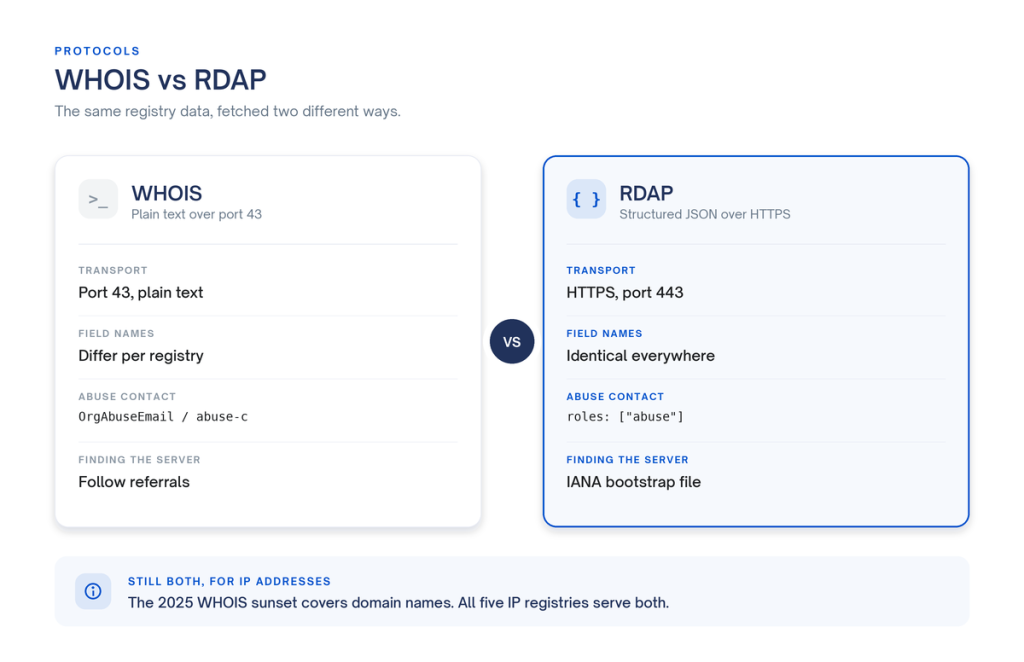
RDAP, the Registration Data Access Protocol, fixes that parsing problem. It serves the same registry data over HTTPS as JSON, against a schema defined in RFC 9083.
					curl -s -H "Accept: application/rdap+json" \
  https://rdap.arin.net/registry/ip/8.8.8.8
Trimmed to the parts that answer the ownership question:
					{
  "handle": "NET-8-8-8-0-2",
  "startAddress": "8.8.8.0",
  "endAddress": "8.8.8.255",
  "ipVersion": "v4",
  "name": "GOGL",
  "type": "DIRECT ALLOCATION",
  "parentHandle": "NET-8-0-0-0-0",
  "status": ["active"],
  "port43": "whois.arin.net",
  "events": [
    { "eventAction": "registration", "eventDate": "2023-12-28T17:24:33-05:00" },
    { "eventAction": "last changed",  "eventDate": "2023-12-28T17:24:56-05:00" }
  ],
  "entities": [
    {
      "handle": "GOGL",
      "roles": ["registrant"],
      "entities": [
        {
          "handle": "ABUSE5250-ARIN",
          "roles": ["abuse"],
          "vcardArray": ["vcard", [
            ["fn",    {}, "text", "Abuse"],
            ["email", {}, "text", "network-abuse@google.com"]
          ]]
        }
      ]
    }
  ]
}
Three things you get out of that.
The keys match at every registry. startAddress and endAddress mean the same thing at RIPE NCC as they do at ARIN. The text records call those inetnum and NetRange. One parser now covers all five.
The abuse contact is a role rather than a field name. Instead of remembering which registry calls it OrgAbuseEmail and which calls it abuse-c, walk entities, find the one whose roles array contains abuse, and read its email. That logic holds whichever registry answered.
Your client finds the right server by itself. IANA publishes a bootstrap file that maps address ranges to registry RDAP base URLs, specified in RFC 9224. No referral chasing.
One caveat worth building for: RDAP standardizes the keys while the values still carry registry vocabulary. ARIN returns “type”: “DIRECT ALLOCATION” and RIPE returns “type”: “ASSIGNED PA”, so keep a small mapping table.
There is also a point about RDAP that gets reported incorrectly. On 28 January 2025, ICANN stopped requiring gTLD registries and registrars to run WHOIS. That change covers domain names. IP address registries sit outside those contracts, all five continue to serve both protocols, and ARIN’s own RDAP response advertises “port43”: “whois.arin.net”.
Running IP WHOIS at scale
A handful of lookups by hand costs you nothing. Push the volume into the thousands and you hit registry rate limits, then spend your time maintaining a parser per registry as the formats drift.
IPstack turns that into one request. Use fields to return only what you need:
curl "https://api.ipstack.com/8.8.8.8?access_key=YOUR_ACCESS_KEY&fields=ip,type,country_name,connection"
The connection object carries the network identity:
					{
  "ip": "8.8.8.8",
  "type": "ipv4",
  "country_name": "United States",
  "connection": {
    "asn": 15169,
    "isp": "Google LLC"
  }
}
The asn value arrives populated on the same address whose WHOIS record left OriginAS blank.
For a batch, pass up to 50 comma-separated addresses in a single call:
curl "https://api.ipstack.com/8.8.8.8,1.1.1.1,193.0.6.139?access_key=YOUR_ACCESS_KEY&fields=ip,connection"
Two things to know before you build on this. connection is a module gated by plan, so a plan without it returns error code 105, function_access_restricted, rather than a partial object. And the free tier answers over http:// only, so HTTPS needs a paid plan. The field list, module availability and full error table are in the IPstack documentation.
IPstack sits in the APILayer suite, so one account, one API key, one dashboard and one invoice cover it and the rest of the catalog.
The API does not replace a registry query everywhere. When you need the record itself, the network handle, the maintainer object, or raw text to attach to an escalation, go to the registry. Use the API for enrichment at volume.
Start with one lookup
For a single check, say an address in your logs or a signup that looks wrong, run it through the free real-time IP lookup and read the answer in your browser.
When one address becomes every request, the same data is available through the real-time IP lookup API.
Frequently asked questions
What does a WHOIS IP lookup show?
It returns the registration record for the address block your IP sits in: the range in both range and CIDR notation, the organization the block is registered to, that organization’s registered address, an abuse contact, and the dates the record was created and last changed.
How do I find out who owns an IP address?
Run whois against the address and read the Organization or OrgName field, or query the registry’s RDAP endpoint and read the entity with the registrant role. Both name the organization holding the block. Check NetType as well: Reallocated or Reassignedmeans the block came from an upstream provider, so the operator you want is one layer below the name you just read.
Can an IP WHOIS lookup tell me who is using an address right now?
No. It identifies the block holder. Providers subdivide and reassign address space, so a record naming a hosting company or an ISP describes the block correctly and says nothing about the customer on that address.
Why is the ASN missing from my WHOIS result?
OriginAS is optional and many records leave it empty, including the record for 8.8.8.8. The ASN comes from routing data rather than registration data. To get it reliably, take it from a source that returns it as a first-class field, such as the connection.asn value in an IPstack response.
Which registry should I query for an IP address?
Most whois clients follow referrals and land on the right one for you. In code, resolve it yourself with IANA’s RDAP bootstrap file, which maps address ranges to the RDAP base URL for ARIN, RIPE NCC, APNIC, LACNIC or AFRINIC.
Try ipstack free
IP-to-location, ASN, ISP, time zone and threat data from one endpoint. Get a key and make your first call in under a minute.

Karam Alsalhani
All articles by Karam →