An IP address rarely belongs to just one website. Shared hosting, CDNs, and cloud servers can place dozens or even thousands of domains on the same address. A reverse IP lookup shows you which domains share that IP.
This guide explains what a reverse IP lookup does, how it differs from a reverse DNS lookup, and where it is actually useful. You’ll also see how to run one from the command line and through an API.
Key Takeaways
- A reverse IP lookup takes an IP address and returns domains associated with or hosted on that address.
- It is not the same as a reverse DNS lookup, which uses a DNS PTR record to map an IP address to a hostname.
- Marketers can use it for competitor research, security teams can use it to investigate shared infrastructure, and hosting buyers can use it to understand how many domains may share an IP.
- Results depend on the data source and how frequently it is updated, so no reverse IP lookup service is guaranteed to be 100% complete.
- You can check IPs one at a time using a browser-based tool or retrieve results programmatically through an API when you need to work at scale.
Before we get into the details, let’s start with a quick definition.
Short Answer: What Reverse IP Lookup Does
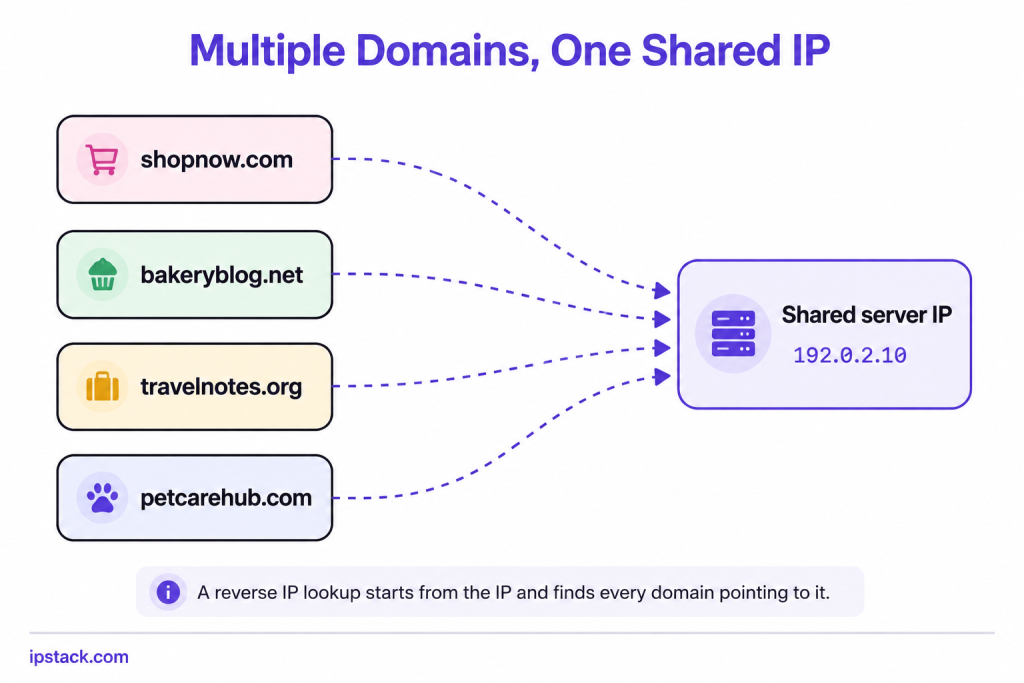
A reverse IP lookup is essentially an IP to domain lookup: it starts with an IP address and returns the domains known to be associated with it. This matters because most websites do not have a server to themselves. Shared hosting, load balancers, and CDNs can put many sites behind the same IP, so knowing the IP alone does not tell you which sites are associated with it.
Say a hosting provider assigns the address 192.0.2.10 to a shared server. That one IP might host a bakery blog, a small ecommerce store, and a travel site, all unrelated to each other. A reverse IP lookup on 192.0.2.10 could return all three if they are present in the lookup service’s dataset.
Now, this sounds close to something else you may have heard of. Let’s clear that up next.
Reverse IP vs Reverse DNS
These two terms get mixed up often, so here’s where they split.
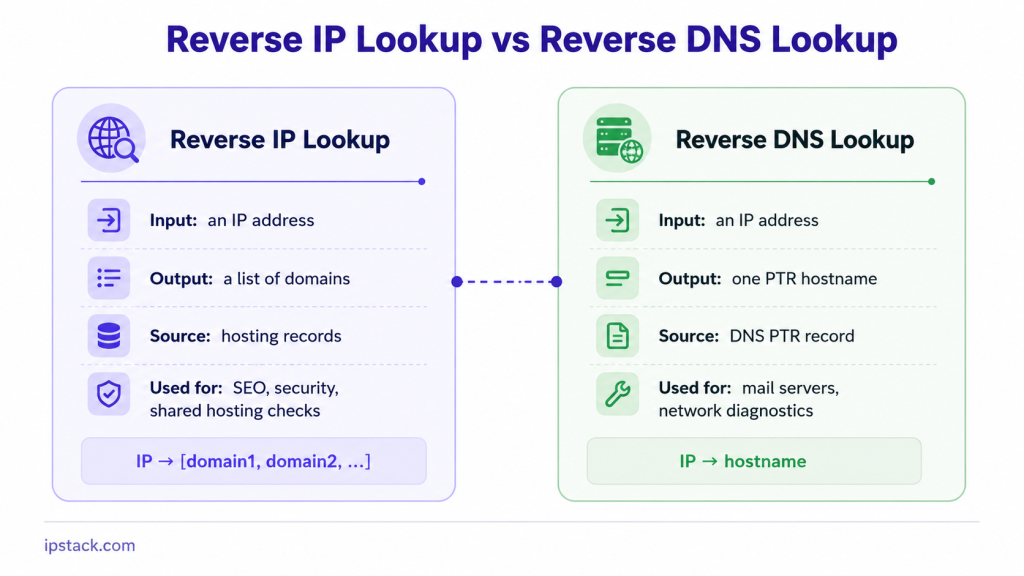
A reverse DNS lookup queries the DNS system for a PTR record associated with an IP address. It returns the hostname configured for that address, such as mail.example.com or a generic server hostname from the hosting provider. It works at the DNS protocol level and is commonly used for mail server checks and network diagnostics.
A reverse IP lookup works differently. Instead of looking for a PTR record, it uses a database of domain-to-IP associations collected and indexed over time. It can return multiple domains associated with the same IP, making it useful for research, infrastructure analysis, and security investigations.
The diagram below sums it up:
Keep this difference in mind, because it changes what each tool is good for. Let’s look at where reverse IP lookup actually gets used.
Legitimate Use Cases
This is not a niche tool. A few teams reach for it regularly.
SEO and competitor research. If you want to see what other domains are associated with a hosting provider or a specific IP, a reverse IP lookup can show you which domains are on the same IP and give you a view of the broader neighbourhood. This can help uncover related sites, potentially connected domains, private blog networks, or duplicate content hosted across multiple domains.
Security investigations. Security analysts can use reverse IP lookups to map infrastructure associated with a suspicious IP. If one domain is flagged for phishing, checking what else is associated with the same IP can reveal a broader pattern, such as multiple suspicious sites hosted on related infrastructure.
Hosting research. Before signing up for shared hosting, some site owners check how many domains are associated with the same IP. A heavily shared IP can provide useful context about the hosting environment, although the number of domains alone does not determine site performance or reliability.
Digital forensics and due diligence. Investigators and teams conducting due diligence on a domain can use reverse IP data alongside other sources to identify infrastructure relationships, investigate historical associations, or spot connections between seemingly separate websites.
These are real, practical uses, but reverse IP results are not a complete picture. Here’s why.
How It Works and Its Limits
It helps to know what is happening behind a reverse IP result, and where it can fall short.
Reverse IP tools typically do not have live access to a server’s complete domain list. Instead, they build their databases from sources such as web crawling, DNS observations, and historical domain-to-IP associations. When you run a lookup, you’re querying that stored data rather than asking the server which domains it currently hosts.
This has a few consequences worth knowing:
- Coverage is never complete. A domain added to a shared IP recently might not appear until the underlying database is updated.
- Old domains can linger. A domain that moved to another IP may still appear if the database has not refreshed its records.
- CDNs complicate results. Large CDNs and cloud load balancers can serve many unrelated domains from shared or rotating IP pools. A reverse lookup on one of those addresses can therefore return a large list that is technically associated with the IP but not particularly useful for identifying a specific origin server.
- Some domains hide behind proxies. Reverse proxies, firewalls, and other intermediary services can conceal the origin IP, so a reverse IP lookup may only reveal the intermediary infrastructure.
None of this makes the tool useless. It simply means you should treat reverse IP results as a useful starting point rather than a definitive record of every domain associated with an IP.
For a quick check, a free IP lookup tool can be enough. For anything at scale, you’ll want the programmatic route.
Doing It Programmatically
Manual checks work well for one IP at a time. For larger workflows, code lets you automate lookups and process results in batches.
Reverse DNS from the command line
If you only need the PTR hostname for a single IP, the dig command handles it directly:
dig -x 8.8.8.8 +shortThis queries the DNS system for the IP’s PTR record and may return a hostname such as:
dns.google.Note that this gives you the hostname associated with the PTR record, not a list of domains sharing the IP. That’s the reverse DNS side of things, not reverse IP.
Where a full domain list comes from
Getting a list of domains associated with an IP means querying a service that maintains an indexed reverse-IP database, built from sources such as crawling and tracking domain-to-IP mappings over time. That’s a different kind of service from a standard IP lookup API, and it’s worth knowing the difference before you go looking for one.
A plain IP lookup API, including IPstack, isn’t designed to return a list of domains associated with an IP. Its job is to take an IP and return information such as location and network data.
Reverse DNS through an API
What an IP lookup API can do in code is the reverse DNS side, returning the PTR hostname alongside other IP information. Here’s a basic request using IPstack’s endpoint with hostname lookup enabled:
curl "<https://api.ipstack.com/{ip_address}?access_key=YOUR_ACCESS_KEY&hostname=1>
Replace {ip_address} with the IP you want to check and add your access key. The hostname=1 parameter tells the API to include the hostname in its response.
import requests

ip_address = "134.201.250.155"
access_key = "YOUR_ACCESS_KEY"

response = requests.get(
    f"",
    params={"access_key": access_key, "hostname": 1}
)

data = response.json()

print(data)
The response gives you the hostname alongside location details such as country, region, and city. That can be useful when you’re checking network or server information alongside the geographic data for an IP. For the full list of available fields, check the IP lookup API documentation.
If your actual goal is to find domains associated with a shared IP, look for a service built specifically for reverse IP lookups. If you’re after hostname or location data, that’s where an API like IPstack fits in, and it’s easy to incorporate into a script once you have the basics working.
Conclusion
A reverse IP lookup answers a simple question: which domains are associated with this address? That single answer can support SEO research, security investigations, and hosting research in ways a reverse DNS lookup cannot, since reverse DNS looks for a PTR record and returns the hostname associated with it.
If you need to check a single IP right now, a dedicated reverse IP tool can return the domains in its database associated with that address. If what you actually need is location or hostname data for an IP, the IP lookup API can return that information and is easy to integrate into a script. Either way, you now know what each approach gives you and where its limits are.
Frequently asked questions
Is reverse IP lookup the same as reverse DNS lookup?
No. Reverse DNS looks up the PTR record for an IP address and typically returns a hostname. Reverse IP lookup uses an indexed database to identify domains associated with that IP address.
Why do reverse IP lookup results sometimes miss domains?
Coverage depends on the data source and how recently its database was updated. New domains may not be indexed yet, while CDNs, reverse proxies, and other infrastructure can make domain-to-IP relationships harder to identify.
Can I run a reverse IP lookup for free?
Yes, some providers offer browser-based tools for individual checks. For repeated or larger-scale lookups, an API is generally more practical.
Does reverse IP lookup work on shared hosting only?
No. It can be performed for any IP address with relevant data. Shared hosting IPs simply tend to produce longer lists because many unrelated domains may use the same address.
Is reverse IP lookup legal?
Generally, looking up publicly available domain and IP associations is not inherently illegal. However, how you use the resulting information can be subject to applicable laws, regulations, and provider terms. Avoid framing it as universally legal in every jurisdiction or use case.
Try ipstack free
IP-to-location, ASN, ISP, time zone and threat data from one endpoint. Get a key and make your first call in under a minute.

Karam Alsalhani
All articles by Karam →