

Every DevOps team has seen an access log full of IP addresses and wondered what they actually mean. The IPs are there, but the useful context is missing.
This article walks through a real batch IP lookup pipeline that you can build in an afternoon. It shows how adding country, ASN, and hosting data next to each request can make your server logs much more useful.
Key Takeaways
- A batch IP lookup step adds country, ASN, and hosting data to logs without slowing down ingestion.
- Removing duplicate IPs before querying can cut lookup volume by up to 90% on a typical access log.
- A JSON IP API maps easily to log fields, so enrichment requires very little transformation code.
- Enriched logs make common questions, such as spike sources, error patterns, and bot traffic, much easier to answer.
- Caching lookups by IP and using a sensible TTL can help keep an IP enrichment API affordable at scale.
The Problem: An IP Column Tells You Nothing at 3 a.m.
A spike hits your error rate at 3 a.m. You open the logs, and every line has an IP address. But the IPs do not tell you where the traffic came from, whether it is one network or a hundred, or whether it is a person or a bot.
At that point, a batch IP lookup step is the cheapest enrichment a log pipeline can add. It takes a column that means nothing on its own and turns it into three useful fields: country, ASN, and a hosting flag.
Most logging setups skip this because it looks like extra work. In practice, it is a small addition. You already have the IPs. You just need somewhere to send them and somewhere to put the results.
That gap between “IP present” and “IP understood” is where the next section starts.
Designing the Batch IP Lookup Step: Batch vs On-Ingest
There are two ways to enrich logs with IP data: look up each IP as it arrives or collect IPs and process them in batches on a schedule. On-ingest lookups seem simple, but they add a network call to your hot path. One slow response can also slow down the request pipeline.
Batch IP lookup avoids this problem. Logs continue to write normally, while a separate job enriches them a few minutes later.
Batch processing also fits how logs behave. The same IPs can appear hundreds of times in an hour, so there is no need to query the same address more than once in a single run.
Bulk IP Address Lookup: Dedupe First, Then Query
Before sending anything to an API, pull the unique IPs from your batch. A busy access log might contain fifty thousand lines but only three thousand distinct addresses. Dedupe reduces lookups by 90 percent on typical logs, so a bulk IP lookup that would otherwise cost fifty thousand calls may need only three thousand.
This step is a single line in most languages:
unique_ips = set(line.split()[0] for line in log_lines)
Run this before every batch, not just once. Traffic patterns change, and yesterday’s dedupe list will miss new visitors.
Once you have a clean bulk IP address lookup list, you need somewhere to send it.
Why a JSON IP API Fits Log Pipelines
Log pipelines already work with structured data such as JSON lines, key-value pairs, or schemas in tools like Elasticsearch. A json ip api returns data in a similar format, so you do not need extra format conversion.
For example, if the API returns country_code, asn, and hosting, you can add them directly as new keys in your log record.
This can save maintenance work. APIs that return XML or custom formats require an extra parser to connect the two systems. With a JSON IP API, you can send an array of IPs, receive an array of objects, and add the results to your log schema with minimal transformation.
With the lookup step designed, the next question is what the complete enrichment code looks like.
Worked Example: A Python Enrichment Step Feeding a Dashboard
Here is a small script that reads a log in the standard nginx combined log format, removes duplicate IPs, looks them up in batches, and writes an enriched version of the log for a dashboard.
					import json
import re
import requests
from collections import defaultdict

LOG_PATH = "access.log"
BATCH_SIZE = 50
API_KEY = "YOUR_ACCESS_KEY"

ip_pattern = re.compile(r"^(\d{1,3}(?:\.\d{1,3}){3})")

def extract_ips(path):
    ips = set()
    with open(path) as f:
        for line in f:
            match = ip_pattern.match(line)
            if match:
                ips.add(match.group(1))
    return list(ips)

def lookup_batch(ip_batch):
    url = "<http://api.ipstack.com/{}".format(",".join(ip_batch)>)
    response = requests.get(url, params={"access_key": API_KEY})
    return response.json()

def enrich_logs(path, ip_data):
    enriched = []
    with open(path) as f:
        for line in f:
            match = ip_pattern.match(line)
            ip = match.group(1) if match else None
            record = {
                "raw": line.strip(),
                "ip": ip,
                "country": ip_data.get(ip, {}).get("country_code"),
                "asn": ip_data.get(ip, {}).get("connection", {}).get("asn"),
 "is_hosting": ip_data.get(ip, {}).get("connection", {}).get("isp") is not None,
            }
            enriched.append(record)
    return enriched

def main():
    unique_ips = extract_ips(LOG_PATH)
    ip_data = {}
    for i in range(0, len(unique_ips), BATCH_SIZE):
        batch = unique_ips[i:i + BATCH_SIZE]
        results = lookup_batch(batch)
        for result in results:
            ip_data[result.get("ip")] = result
    enriched = enrich_logs(LOG_PATH, ip_data)
    with open("enriched_access.jsonl", "w") as out:
        for record in enriched:
            out.write(json.dumps(record) + "\n")

if __name__ == "__main__":
    main()
The output is a JSON Lines file with one enriched record per log line. You can load it into a dashboard tool or log shipper. The basic flow is simple: look up the IPs, merge the results, and write the enriched records.
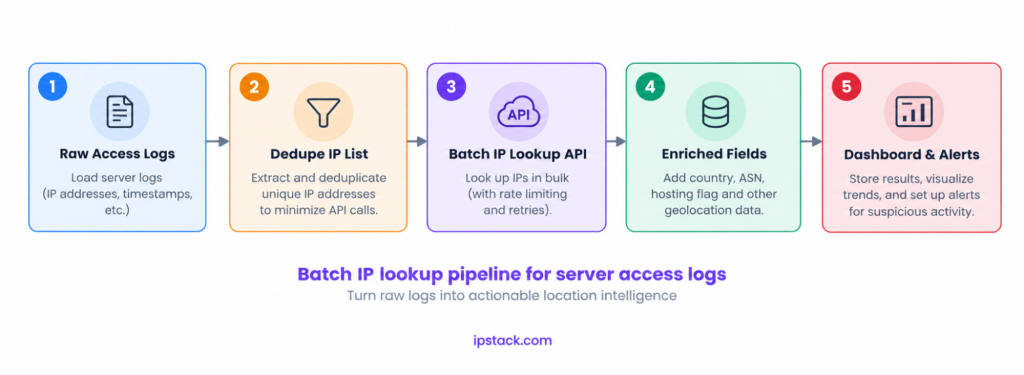
Once these fields are available, the ASN value adds another useful layer of detail.
ASN Lookup by IP: Turning Addresses Into Networks
A single IP tells you about one address. An ASN lookup by IP tells you which network that address belongs to.
Two IPs that look unrelated in your logs may belong to the same autonomous system. Grouping requests by ASN can turn a few unusual requests into a clear traffic pattern. If your enriched logs already include an ASN field, most log tools can group by it with a simple query.
An IP lookup ASN field can also be more useful than a raw IP for long-term tracking. IP addresses can be reassigned, while the ASN behind a data center or ISP can remain the same for much longer.
With the fields defined and the code running, the next step is to see what these values can tell you when something goes wrong.
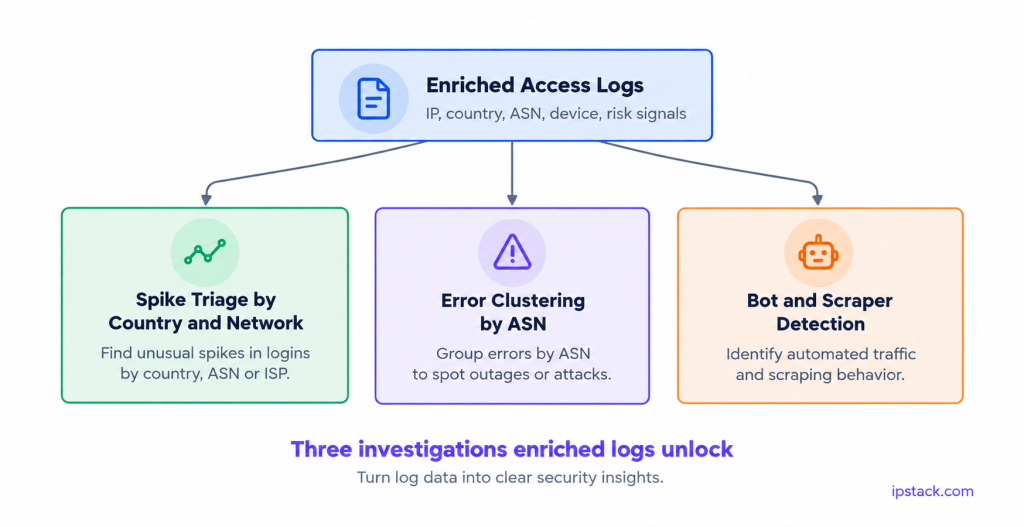
Three Investigations Enriched Logs Unlock
Once logs include country, ASN, and hosting data, several common investigations become much easier to answer.
Spike Triage by Country and Network
When traffic suddenly jumps, group your enriched logs by country and ASN. If most of the spike comes from two or three networks, you can quickly see where the traffic is coming from instead of guessing.
Error Clustering by ASN
Group your 4xx and 5xx errors by ASN instead of individual IPs. Thousands of addresses can look like separate problems, but grouping them by ASN may reveal that they come from just a few networks. This can point to a misbehaving client, a broken integration, or traffic coming through a rotating pool of addresses.
Bot and Scraper Detection Through Hosting Flags
A hosting flag shows whether traffic comes from a residential connection or a data center. A sudden increase in requests from hosting networks, especially across many IPs in the same ASN, can be a useful signal for scraping. You can use it alongside other signals when deciding whether to apply rate limits or a challenge.
These three investigations cover many common DevOps questions, but running lookups at scale brings its own set of decisions.
Cost Control: Cache TTLs and Choosing an IP Enrichment API
An IP address usually does not change its country or ASN every hour, so you do not need to look it up that often. Cache each lookup result by IP and set a TTL of a day or a week, depending on how often IP assignments change in your traffic.
Caching can reduce your API calls significantly on top of the deduplication savings from earlier in the pipeline.
When choosing an IP enrichment api, check a few practical things: how many IPs you can send in one batch, whether ASN and hosting data are included, and how pricing changes as your log volume grows. A plan that looks affordable at a thousand lookups a day can be very different at ten million.
With deduplication, caching, and a sensible batch size, your actual lookup volume can be much lower than your raw log line count. This helps keep the pipeline affordable as traffic grows.
Conclusion
An IP column without enrichment is a wasted field. Once country, ASN, and hosting data sit next to each request, your logs can answer questions that once required manual digging: where a traffic spike came from, which network keeps producing errors, and whether a traffic pattern looks like a bot.
You do not need to rebuild your logging stack to get these benefits. A dedupe step, a batch call to a JSON IP API, and a small amount of glue code are enough to get started.
Frequently asked questions
How many IPs can I look up in one batch?
Batch size limits vary by provider and plan. A safe starting point for many access log volumes is 50 IPs per request. This keeps individual calls manageable and makes failed requests easier to retry.
Should I enrich logs at ingest or after the fact?
For most teams, enriching logs after the fact is the better default. Batch enrichment keeps network calls out of the ingestion path and lets you deduplicate IPs before making lookups. Enrich at ingest when you need country or ASN data for a real-time decision, such as routing or blocking a specific request.
Try ipstack free
IP-to-location, ASN, ISP, time zone and threat data from one endpoint. Get a key and make your first call in under a minute.

Karam Alsalhani
All articles by Karam →