The best api project ideas share three traits: you can finish them in a weekend, they visibly do something, and they earn a spot in your portfolio.
One free API key unlocks seven of them, because a single IP lookup returns location, timezone, currency and network data, which is a surprising amount of raw material.
To follow along, get your free key. One API key is enough to try all seven projects.
Quick answer A good weekend API project is finishable in two days, visibly does something, and demonstrates a real skill. A free IP geolocation API is ideal source material: one GET request returns location, timezone and currency data that can power a visitor greeter, a personal dashboard, a meeting scheduler, a price switcher, a traffic logger, a VPN checker or a chat bot, all without any infrastructure. Every project below runs within the free tier.
Key Takeaways
- A good weekend project should be small, useful, and easy to show.
- One IP lookup can give you location, timezone, currency, and network data.
- Start with the flag greeter to understand the API response.
- Cache lookups for 24 hours to reduce unnecessary API requests.
- Choose a project based on the skill you want to show.
The 7 Projects at a Glance
Here is a quick look at all seven ip api projects, including their difficulty and estimated time.
These side project ideas for developers range from a quick two-hour project to a full weekend build.
Project | Difficulty | Time |
Visitor country flag greeter | Easy | 2 hours |
Personal where-am-I dashboard | Easy | Half a day |
Timezone-aware meeting link page | Medium | One day |
Currency price switcher | Medium | Half a day |
Traffic origin logger | Medium | Half a day |
Travel VPN checker | Easy | 2 hours |
Discord/Slack IP annotator bot | Harder | Full weekend |
All seven projects start with the same IP lookup. You just use different fields from the response.
Let’s start with the easiest of these api project ideas.
Project 1: Visitor Country Flag Greeter
This is the quickest project on the list and a simple way to see what the API returns.
The idea is simple: show a visitor’s country flag and greet them based on their location.
					const d = await (await fetch(
  "https://api.ipstack.com/check?access_key=YOUR_KEY")).json();

const flag = [...d.country_code].map(
  c => String.fromCodePoint(0x1F1A5 + c.charCodeAt(0))).join("");

document.body.insertAdjacentHTML("afterbegin",
  `<h2>${flag} Hello, visitor from ${d.country_name}!</h2>`);
The code makes one API request, gets the visitor’s country code, turns it into a flag emoji, and displays a greeting.
Once you understand the response, the other projects become easier.
Project 2: Personal Where-Am-I Dashboard
One page showing everything your connection reveals: city, coordinates on a map tile, timezone, currency, ISP.
The most visual project of the seven and the one to screenshot for your portfolio.
					const d = await (await fetch(
  "https://api.ipstack.com/check?access_key=YOUR_KEY")).json();

for (const [k, v] of Object.entries({
  City: d.city,
  Region: d.region_name,
  ISP: d.connection.isp,
  Timezone: d.time_zone.id,
  Currency: d.currency.code
}))
  list.insertAdjacentHTML("beforeend", `<li><b>${k}</b>: ${v}</li>`);
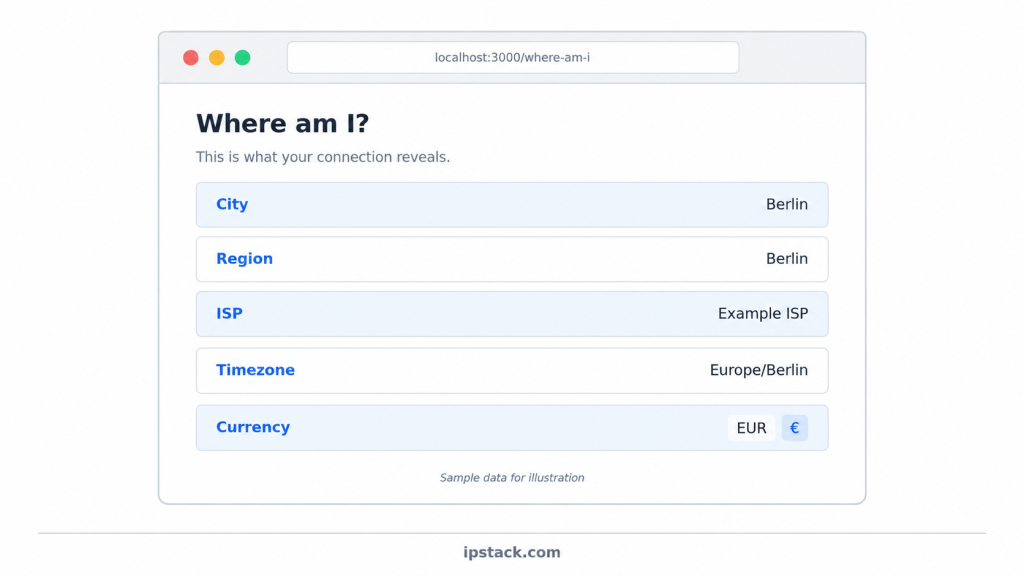
The loop takes the API response and turns the values into a list on the page.
You can also add a map using the latitude and longitude from the response.
Project 3: Timezone-Aware Meeting Link Page
A booking page that renders your availability in the visitor’s local time, using the time_zone.id from the lookup and Intl.DateTimeFormat for the conversion.
The project that teaches you more about dates than any tutorial
					const zone = d.time_zone.id;   // e.g. "Asia/Kolkata"
const slot = new Date("2026-10-05T15:00:00Z");

el.textContent = new Intl.DateTimeFormat("en", {
  timeZone: zone,
  dateStyle: "full",
  timeStyle: "short"
}).format(slot);   // shown in the visitor's local time
Replace the example date with your own meeting time.
Then try the page from different time zones to see how the displayed time changes.
How do I detect a user’s timezone from their IP address?
Send the visitor’s IP address to a geolocation API and read the timezone field.
With IPstack, that field is time_zone.id. It contains a timezone name such as Asia/Kolkata.
You can then pass that value to Intl.DateTimeFormat, which handles the time conversion.
Browsers can also provide the user’s timezone directly. An IP lookup is useful when you need the information on the server.
Project 4: Currency Price Switcher
A pricing table that shows amounts in the visitor’s own currency symbol using the currency fields, with a small hardcoded rate table for the demo.
The classic conversion booster, built in an afternoon.
					const cur = d.currency.code;          // "EUR"
const rates = {
   USD: 1,
   EUR: 0.92,
   GBP: 0.79,
   INR: 83
};

price.textContent = `
${d.currency.symbol}
${(29 * (rates[cur] ?? 1)).toFixed(0)}/mo`;
The ?? 1 gives you a fallback when the currency is not in your demo rate table.
For a simple demo, a small hardcoded table is enough.
How can I show prices in local currency based on a visitor’s IP?
First, look up the visitor’s IP address.
Then read currency.code and currency.symbol from the response. Use the currency code to find the exchange rate and calculate the local price.
A hardcoded rate table is fine for a demo. For a real application, use a proper exchange rate service and cache the results.
Remember that displaying a local price is different from actually processing a payment in that currency.
Project 5: Traffic Origin Logger
A tiny server-side logger that enriches each request with its country and keeps a daily tally.
Day two, you have a real chart of where your traffic comes from; week two, you have opinions about it.
Python/Flask example:
					@app.before_request
def tally():
    d = cached_lookup(request.remote_addr)     # from the Python tutorial
    if d:
        counts[d["country_code"]] = counts.get(d["country_code"], 0) + 1
Caching is important here because the same visitor can make many requests.
Store each lookup for around 24 hours instead of making a new API request for every page view.
You can then send the counts to a chart library and create a simple daily traffic report.
Project 6: Travel VPN Checker (Am I Where I Think I Am)
This project answers a simple question: Where does the internet think I am?
A single page that compares where your IP says you are against where you expect to be.
On hotel wifi and VPNs the answers diverge in interesting ways, and the project doubles as a genuinely useful travel tool.
					const said = `${d.city}, ${d.country_name}`;
verdict.textContent = said === expected
  ? `All good: you appear in ${said}.`
  : `Heads up: the internet thinks you are in ${said}.`;
Set expected to the location you are expecting.
Keep in mind that IP-based city results are not always exact, so treat a different result as a hint rather than proof.
Project 7: Discord or Slack Bot That Annotates IPs
This is the biggest project on the list and can make a strong portfolio project.
The idea is to create a bot command that replies to any pasted IP with its location and ISP, which your ops channel will adopt within a day.
The most portfolio-differentiating build of the seven: it shows API composition, bot frameworks and a real use case in one repo.
					// Discord.js sketch
if (msg.content.startsWith("!ip ")) {
  const d = await geolocate(msg.content.slice(4).trim());
  msg.reply(d
    ? `${d.ip}: ${d.city}, ${d.country_name}(${d.connection.isp})`
    : "No data for that address.");
}
The geolocate helper makes the API request for the IP address.
You can also reuse the cache from Project 5 so repeated lookups do not make unnecessary API requests.
It is also a good idea to check that the input looks like a valid IP address before making the request.
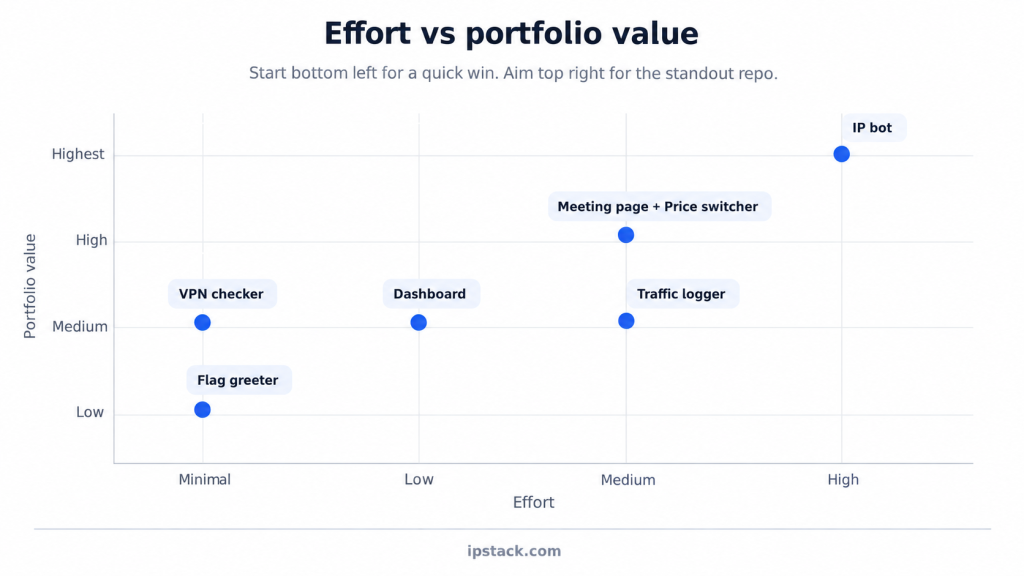
Picking One Based on Effort and Portfolio Value
These projects do not all have the same level of effort or portfolio value.
Choose one based on what you want to learn or show.
Project | Effort | Portfolio value | Pick it if |
Flag greeter | Minimal | Low | You want a quick win |
Dashboard | Low | Medium | You want a project screenshot |
Meeting page | Medium | High | You want to show product thinking |
Price switcher | Medium | High | You are interested in ecommerce |
Traffic logger | Medium | Medium | You have a website with visitors |
VPN checker | Minimal | Medium | You travel or use VPNs |
IP bot | High | Highest | You want a standout project |
What is the best free IP geolocation API for a production pricing page?
There is no single best option for every project.
For a pricing page that changes based on visitor location, check:
- Whether the free plan works without a credit card.
- Whether requests use HTTPS.
- Whether the response includes country and currency.
- Whether the monthly request limit is enough for your traffic.
- Whether you can add caching.
IPstack’s free tier can work for a small project, especially when you add caching. For a larger application, check the current limits and choose a plan that fits your traffic.
Before launching, test the pricing page with visitors from the countries you care about.
Frequently asked questions
What is a good IP geolocation API with a generous free tier?
For a weekend project, look for an API that is easy to set up, supports HTTPS, and gives you enough requests for development and testing.
IPstack’s free tier can be used for the projects in this article, especially when you add caching.
Can I get IP geolocation with no credit card required?
Yes.
The free key signup does not require a payment method for these projects.
If your project grows beyond the free monthly limit, you can consider a paid plan.
Are free IP geolocation APIs good enough for production?
They can be enough for small applications.
Caching can reduce the number of API requests you make. Larger applications may eventually need more requests, higher limits, an uptime SLA, or priority support.
Check the current plan limits before launching a production application.
Which project should I build first?
Build the flag greeter tonight to learn the response shape, then commit the weekend to whichever high-value project matches your goals:
- Meeting page – for product-thinking roles
- Price switcher – for ecommerce work
- The bot – for the standout repository
Try ipstack free
IP-to-location, ASN, ISP, time zone and threat data from one endpoint. Get a key and make your first call in under a minute.

Karam Alsalhani
All articles by Karam →