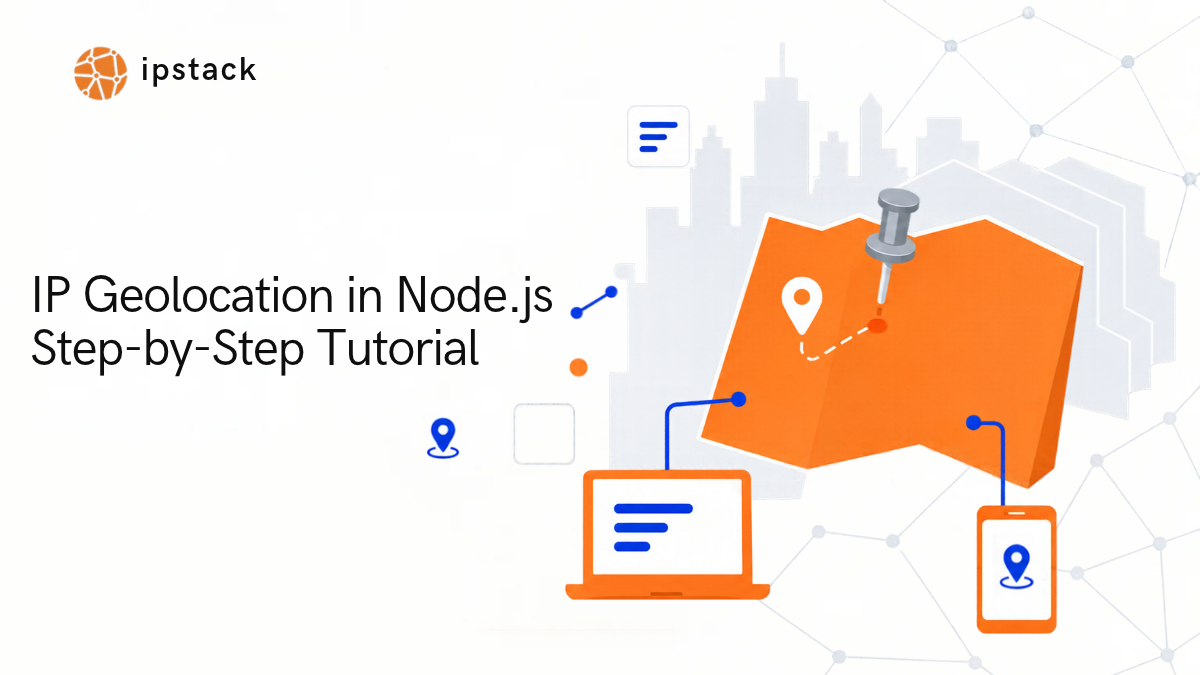
You can add IP geolocation to a Node.js application with a simple API request. The basic flow is simple : capture an IP address, send it to a geolocation API, and utilize the returned location data inside your application logic.
In this tutorial, we will build that exact flow using Node.js and Express alongside IPstack. We will start with a basic single-IP lookup script, scale it into a reusable Express API endpoint, handle incoming visitor IP addresses dynamically, and inspect the structural payload returned by the service.
Finally, we will take the integration a step further by connecting IPstack to AI clients using the Model Context Protocol (MCP).
This allows an AI tool (such as Cursor, Claude Desktop, or Windsurf) to execute live IP lookups autonomously as a tool instead of hallucinating location data or relying solely on pre-existing prompt context.
IPstack delivers IP-based location, timezone, currency, ISP, connection type, and security intelligence through a unified REST API supporting both IPv4 and IPv6 addresses.
What You Will Build
By the end of this tutorial, you will have a working Express API that accepts an IP address parameter and returns parsed geolocation data.
Client —-> Node.js + Express —-> IPstack API —-> Location Data
You will also learn how to expose this exact same IP lookup capability directly to AI applications using MCP servers.
What Is IP Geolocation in Node.js?
IP geolocation maps an IP address to geographic and network metadata, including country, region, city, postal code, latitude, longitude, Internet Service Provider (ISP), Autonomous System Number (ASN), timezone, and primary currency.
Node.js does not calculate or map this spatial data natively. Instead, your backend application forwards the target IP address to an external geolocation database service and processes the returned JSON data.
Common backend use cases include:
- Localized Content: Tailoring site content or product inventory to a user’s region.
- Regional Settings: Auto-selecting default currencies, languages, or timezones.
- Access Control: Restricting features or enforcing compliance based on region.
- Security & Fraud Prevention: Detecting proxy/VPN usage or flag high-risk connection origins.
Prerequisites
To follow this tutorial, ensure you have:
- Node.js installed locally (v14+ recommended).
- Basic familiarity with JavaScript (ES6 syntax, Promises, async/await).
- An active IPstack API Key (Get one free from the APILayer Dashboard).
Note: IPstack is part of the APILayer suite. A single developer account provides unified access, API keys, dashboard tracking, and invoicing across the full APILayer API tool ecosystem.
Step 1: Create a Node.js and Express Project
First, initialize a clean project workspace and install the required dependencies: Express for the web framework, Axios for HTTP requests, and dotenv for environment variable management.
					mkdir ip-geolocation-app
cd ip-geolocation-app
npm init -y
npm install express axios dotenv
Create a file named server.js. Your project structure should look like this:
					ip-geolocation-app/
├── node_modules/
├── .env
├── package.json
└── server.js
Step 2: Store Your IPstack API Key
To follow security best practices, never hardcode your API keys directly inside source code. Store secret credentials in environment variables using a .env file.
Create a .env file in your root folder:
					IPSTACK_API_KEY=YOUR_ACTUAL_API_KEY_HERE
PORT=3000
Load and reference this variable safely in your application using dotenv:
					require('dotenv').config();
const apiKey = process.env.IPSTACK_API_KEY;
Step 3: Make Your First IPstack Request
The core IPstack lookup endpoint expects a target IP address appended directly to the path:
https://api.ipstack.com/134.201.250.155?access_key=YOUR_API_KEY
(Note: IPstack also supports requester IP lookups via the /check endpoint when you want the API to automatically detect the IP address making the incoming HTTP request).
Let’s test the primary lookup endpoint in isolation. Add the following code snippet to your server.js file:
					console.log( 'Code is Poetry' );require('dotenv').config();
const axios = require('axios');
const apiKey = process.env.IPSTACK_API_KEY;

async function getIpLocation(ip) {
  try {
    const response = await axios.get(`https://api.ipstack.com/${ip}`, {
      params: { access_key: apiKey }
    });
    return response.data;
  } catch (error) {
    console.error('API Error:', error.response?.data || error.message);
    throw error;
  }
}

// Test with a sample IP address
getIpLocation('134.201.250.155')
  .then(data => console.log('Location Payload:', JSON.stringify(data, null, 2)))
  .catch(err => console.error(err));
Execute the script from your terminal:
node server.js
Step 4: Understand the IPstack Response
IPstack returns a structured JSON payload containing granular geographic and routing metadata.
Here is an example response structure for IP 134.201.250.155:
					{
  "ip": "134.201.250.155",
  "hostname": "134.201.250.155",
  "type": "ipv4",
  "continent_code": "NA",
  "continent_name": "North America",
  "country_code": "US",
  "country_name": "United States",
  "region_code": "CA",
  "region_name": "California",
  "city": "Los Angeles",
  "zip": "90013",
  "latitude": 34.0655,
  "longitude": -118.2405,
  "location": {
    "geoname_id": 5368361,
    "capital": "Washington D.C.",
    "languages": [
      {
        "code": "en",
        "name": "English",
        "native": "English"
      }
    ],
    "country_flag": "https://assets.ipstack.com/flags/us.svg",
    "country_flag_emoji": "🇺🇸",
    "is_eu": false
  },
  "connection": {
    "asn": 25876,
    "isp": "Los Angeles Department of Water & Power"
  }
}
Key Fields Explained:
- country_name / country_code: Useful for country-based localization or redirect logic.
- region_name / city: Used to surface local regional data or tailor regional pricing.
- latitude & longitude: Essential for placing pins on dynamic web maps.
- connection.asn & connection.isp: Crucial for network analysis, identifying hosting providers, or detecting corporate networks.
Step 5: Build an Express IP Geolocation Endpoint
Now let’s turn this logic into a server route that your frontend or mobile app can consume. We will expose an Express GET route:
GET /api/geolocation/:ip
Replace the contents of server.js with this production-ready implementation:
					require('dotenv').config();
const express = require('express');
const axios = require('axios');

const app = express();
const PORT = process.env.PORT || 3000;
const IPSTACK_API_KEY = process.env.IPSTACK_API_KEY;

// Route: Get location by path parameter
app.get('/api/geolocation/:ip', async (req, res) => {
  const { ip } = req.params;

 try {
    const response = await axios.get(`https://api.ipstack.com/${ip}`, {
      params: { access_key: IPSTACK_API_KEY }
    });

// IPstack returns errors as 200 OK with an error object inside the payload
    if (response.data.error) {
      return res.status(400).json({
        success: false,
        error: response.data.error.info || 'Invalid request parameters.'
      });
    }

res.json({ success: true, data: response.data });
  } catch (error) {
    console.error('Upstream Request Failed:', error.message);
    res.status(500).json({ success: false, error: 'Unable to fetch IP geolocation data' });
  }
});

app.listen(PORT, () => {
  console.log(`Server listening at http://localhost:${PORT}`);
});
Start your server:
node server.js
Test it in your browser or client tool:
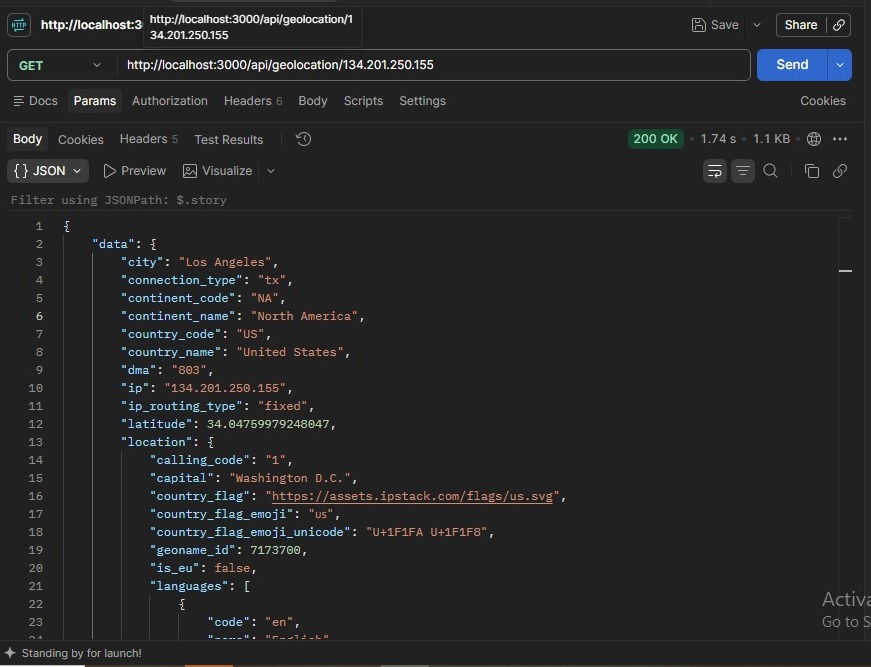
Building your own backend proxy endpoint keeps your API keys secure on the server side and allows you to attach custom application layer middleware—such as user authorization, request validation, response caching, or rate limiting—before querying upstream services.
How Do I Get a User’s IP Address in Express?
Instead of requiring users to supply an IP in the URL, you can inspect incoming web client connections dynamically using Express’s built-in req.ip attribute.
					app.get('/api/my-location', async (req, res) => {
  // Extract client IP address automatically
  const clientIp = req.ip;

try {
    const response = await axios.get(`https://api.ipstack.com/${clientIp}`, {
      params: { access_key: IPSTACK_API_KEY }
    });
    res.json(response.data);
  } catch (error) {
    res.status(500).json({ error: 'Unable to determine location from request' });
  }
});
Important: Reverse Proxies & Proxy Trust
If your Express app is deployed behind a reverse proxy, load balancer, or CDN (such as Nginx, AWS ALB, Cloudflare, or Heroku), req.ip will return the internal IP address of the proxy rather than the real end-user client.
Express inspects the X-Forwarded-For header to determine the original client IP. To enable this behavior safely, configure the trust proxy setting:
					// Enable for a single trusted reverse proxy directly in front of Express
app.set('trust proxy', 1);
// Or enable based on IP networks/subnets
// app.set('trust proxy', 'loopback');
Security Warning: Do not blindly set app.set(‘trust proxy’, true) in production. Doing so allows malicious clients to spoof client IP headers (X-Forwarded-For) if your application is not sitting directly behind a properly configured proxy strip layer.
Step 6: Select the Data Your Application Needs
If your backend only requires basic fields (e.g., country code or coordinates), fetching the full response body wastes memory and bandwidth. IPstack allows you to filter returned payload keys directly via the fields parameter:
					const response = await axios.get(`https://api.ipstack.com/${ip}`, {
  params: {
    access_key: IPSTACK_API_KEY,
    fields: 'country_code,city,latitude,longitude'
  }
});
This returns a slimmed-down object focused only on your requested keys:
					{
  "country_code": "US",
  "city": "Los Angeles",
  "latitude": 34.0655,
  "longitude": -118.2405
}
Step 7: Add IP Security Data When You Need It
For security auditing, fraud detection, or spam prevention, IPstack offers an additional Security Module via the security=1 query parameter.
					const response = await axios.get(`https://api.ipstack.com/${ip}`, {
  params: {
    access_key: IPSTACK_API_KEY,
    security: 1
  }
});
When enabled, the returned payload includes an enriched security block:
					{
  "security": {
    "is_proxy": false,
    "proxy_type": null,
    "is_crawler": false,
    "crawler_name": null,
    "crawler_type": null,
    "is_tor": false,
    "threat_level": "low",
    "threat_types": null
  }
}
Note: Security Module attributes (such as proxy/Tor identification and threat level scoring) are available on specialized or paid plan tiers. Always verify your account feature set in the APILayer dashboard before building production features against security payload structures.
Step 8: What Is MCP and Why Use It With IP Geolocation?
MCP (Model Context Protocol) is an open protocol standard that lets AI models interact safely with external services through structured tools and context providers.
Rather than making an AI model guess location details or relying on outdated internal training data, an MCP-enabled AI client can dynamically query live APIs—like IPstack—in real time.
For example, when a developer asks an AI coding assistant:
“Check where IP address 185.220.101.34 is located and whether it poses a security threat.”
The AI tool calls the IPstack MCP server function directly, reads the exact diagnostic data, and presents an accurate analysis to the user.
Step 9: Connect IPstack to an MCP Client
APILayer distributes an official MCP package @apilayer/mcp-server that exposes IPstack functions as callable AI tools.
Option A: Local npx MCP Configuration
In compatible AI environments (e.g., Cursor, Claude Desktop, Windsurf, or Cline), add the server definition to your workspace or global MCP configuration JSON file:
					{
  "mcpServers": {
    "apilayer": {
      "command": "npx",
      "args": ["-y", "@apilayer/mcp-server"],
      "env": {
        "APILAYER_ACCESS_KEY": "YOUR_APILAYER_API_KEY"
      }
    }
  }
}
Option B: Remote Hosted MCP Endpoint
Alternatively, if your client supports remote HTTP/SSE-based MCP connections, connect to APILayer’s hosted endpoint:
- Endpoint: [https://mcp.apilayer.com/mcp](https://mcp.apilayer.com/mcp)
- Authentication: Bearer token (Bearer YOUR_APILAYER_API_KEY)
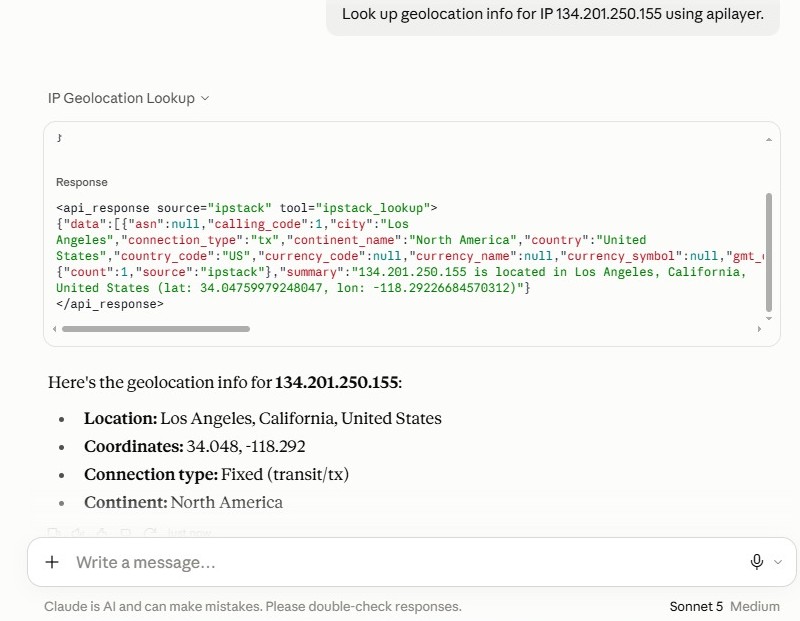
Step 10: Test an IP Lookup Through MCP
Once connected, your AI workspace automatically discovers the IPstack tools.
When the AI agent encounters an IP address inquiry, it invokes the tool payload behind the scenes:
					// Tool Call Invoked by AI Agent:
apilayer · standard_lookup {
  "ip": "185.220.101.34",
  "security": 1
}
The tool returns the structured API payload directly back to the AI context:
					{
  "ip": "185.220.101.34",
  "country_name": "Austria",
  "region_name": "Vienna",
  "city": "Vienna",
  "connection": {
    "asn": 208323,
    "isp": "Foundation for Applied Privacy"
  },
  "security": {
    "is_proxy": false,
    "is_tor": true,
    "threat_level": "high",
    "threat_types": ["tor"]
  }
}
REST, Express, or MCP: Which Approach Should You Use?
Each architecture serves a specific operational boundary within your technical stack:
|
Integration Pattern |
Ideal Use Case |
Key Advantage |
|---|---|---|
|
Direct REST API |
Client-side utilities or standalone scheduled scripts. |
Minimal abstraction; simple HTTP requests. |
|
Express Middleware |
Production application backends and user-facing APIs. |
Secure credential management, proxy configuration, caching, rate-limiting, and validation. |
|
MCP Server |
AI Agents, IDE Extensions, and DevSecOps assistants. |
Allows AI models to run live IP security diagnostics dynamically on command. |
Common Mistakes to Avoid
- Exposing API Keys in Client-Side JavaScript: Never embed your IPstack API key inside frontend browser scripts or public mobile apps. Route lookups through your Express backend proxy server instead.
- Ignoring Express trust proxy Configurations: Reading req.ip without configuring app.set(‘trust proxy’, …) behind load balancers returns the internal proxy IP address rather than the client’s public address.
- Confusing IP Geolocation with GPS Positioning: IP geolocation estimates network routing points. It provides accurate country/city-level region estimates but should never be treated as an exact physical GPS coordinate of a physical device.
- Assuming All Fields Are Standard Across All Tiers: Advanced features like security risk scoring, proxy detection, and connection type identification depend on your active API plan capabilities. Always check key access in your APILayer dashboard.
Adding IP geolocation capabilities to a Node.js Express service requires only a few structured lines of code. By wrapping the IPstack REST API inside custom server routes, you maintain complete governance over key security, IP parsing, and network edge proxy headers.
By taking advantage of modern standards like the Model Context Protocol (MCP), you can expose these same geolocation capabilities directly to AI assistants—turning your AI workflows into powerful engines for network intelligence and security triage.
Official Documentation & Resources
Frequently asked questions
How do I get a user's IP address in Express?
Access req.ip within your route handler. If your app sits behind a reverse proxy or load balancer, configure app.set(‘trust proxy’, 1) so Express correctly parses the X-Forwarded-For header.
How do I convert an IP address to a location in Node.js?
Send an HTTP GET request containing the target IP address to an IP geolocation provider (such as IPstack) using an HTTP client like Axios or native fetch(), then process the returned JSON response containing city, country, and coordinate data.
Is IP geolocation completely accurate?
IP geolocation provides reliable city, region, and country estimates based on network routing, ISPs, and registry allocations. However, it is an indirect network estimate and cannot replace exact hardware GPS tracking.
How do I expose IP geolocation lookups to AI assistants using MCP?
Install and configure @apilayer/mcp-server inside your AI client settings (such as Claude Desktop, Cursor, or Windsurf), configure your APILAYER_ACCESS_KEY environment variable, and allow your AI model to invoke IPstack lookup functions natively as external tools.
Try ipstack free
IP-to-location, ASN, ISP, time zone and threat data from one endpoint. Get a key and make your first call in under a minute.

Karam Alsalhani
All articles by Karam →