An IP address is just a number. But the network behind that number tells you more. A visitor coming from a datacenter is different from one coming through a home broadband connection, and neither is the same as someone browsing on mobile data. Connection type is one of the quickest signals you can use to understand where a request is coming from. Understanding the difference between a datacenter IP vs residential IP can help you identify the type of network behind a request.
That distinction matters more than it sounds. Two visitors can share the same country, the same city, even the same hour of the day, and still represent very different kinds of traffic. One might be a real shopper. Another might be an automated process running from a rented server. Connection type won’t tell you the whole story, but it’s a useful signal to consider alongside other traffic and security signals.
Key Takeaways
- Datacenter IPs are typically assigned to servers and cloud providers, so traffic from them can be more likely to come from automated systems.
- Residential IPs are assigned by home ISPs and are commonly associated with individual households and genuine user traffic.
- Mobile IPs are often shared across many devices through carrier-grade NAT (CGNAT), so one IP can represent many different users.
- Connection type can be identified through network and ASN classification rather than inferred from the IP address alone.
- The best approach is to define a policy for each connection type, such as allow, verify, or review, rather than applying one blanket rule to every IP.
Before going into detail, here is the quick version.
Short Answer: The Three Types and the One-Line Story Each Tells
Each connection type carries its own default story, and knowing that story upfront helps you avoid misreading a visitor.
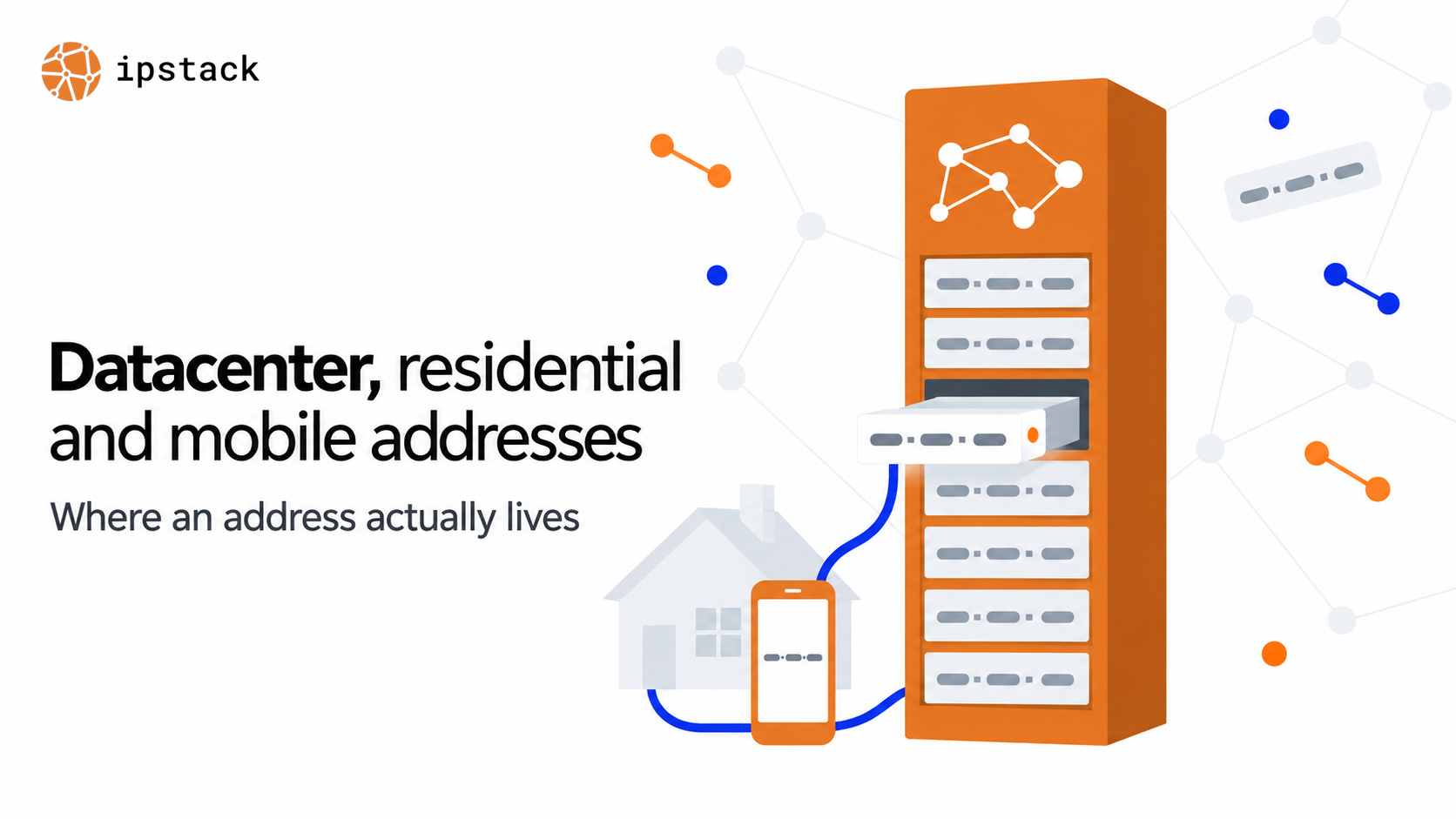
A datacenter IP usually points to traffic coming from a server or cloud network, which can include bots, proxies, and automated services. A residential IP is typically assigned through a home ISP and is more commonly associated with individual users. A mobile IP usually comes from a cellular carrier and may be shared across many users behind the same address. None of these are hard rules. They’re starting points, and the rest of this article shows you how to use them.
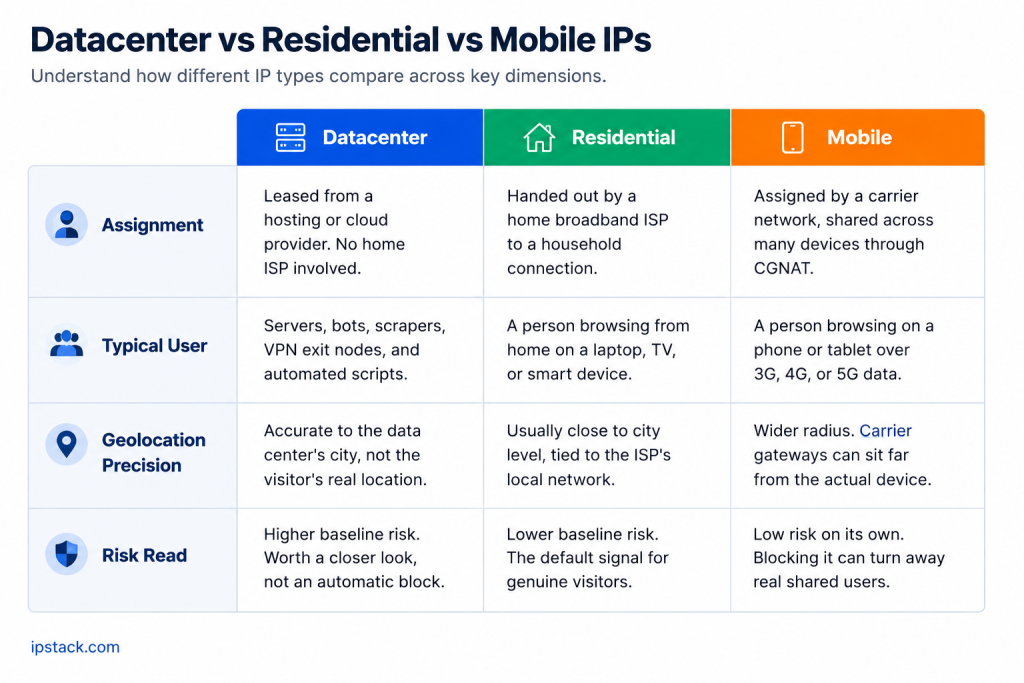
That one-line summary is useful, but the real value shows up when you look at the datacenter IP vs residential IP distinction, along with how mobile IPs differ.
Datacenter IPs: Servers, Scrapers, VPN Exits
A datacenter IP is typically assigned to a hosting company or cloud provider rather than a residential ISP. It usually represents traffic coming from a server or other hosted infrastructure.
Hosting IP detection can help identify whether an IP address belongs to a hosting provider, cloud network, or other datacenter infrastructure.
Datacenter IPs are commonly used by servers, scripts, bots, VPNs, and proxies. A real person can also appear behind one, but usually because their traffic is being routed through hosted infrastructure rather than directly through their home or mobile connection.
That is why datacenter traffic often gets extra attention in fraud checks and bot detection. It is not proof of malicious intent. Legitimate traffic can come from monitoring services, corporate infrastructure, VPNs, and other automated systems. But if a checkout suddenly sees a large number of orders coming from the same datacenter network, that is a useful signal to investigate rather than automatically allow or block.
Geolocation can also be less representative of the actual user. A datacenter IP generally identifies the network location of the server, which may be far from where the person or service generating the request is actually located.
If you’re building fraud or bot-detection logic around this signal, connection type is only one input. Combining it with other signals gives you a much more reliable picture of the traffic.
Datacenter IPs can provide a useful first signal. Residential and mobile IPs require a little more context.
Residential IPs: The Default Human Signal, and the Proxy Complication
The residential IP meaning is straightforward: it is an IP address typically assigned to a home or consumer internet connection.
A residential IP is typically assigned through a home internet provider. It’s the connection type behind much of everyday browsing, from people using laptops at home to smart TVs and other connected devices.
When someone opens your site from a home broadband or fiber connection, their ISP typically assigns their connection a residential IP. Because these addresses are associated with consumer networks, residential traffic can be a useful signal when distinguishing everyday users from traffic coming directly from hosted infrastructure.
There is a wrinkle worth knowing about. Residential proxy networks route traffic through real consumer connections, sometimes using devices whose owners have opted into a service without fully understanding how their connection will be used. That means a residential IP is not proof that a genuine person is behind the request. It simply makes the traffic look more like traffic from a typical consumer network.
For everyday use cases such as localization, currency defaults, or basic personalization, residential IPs can be a useful starting signal. For higher-stakes decisions such as fraud screening, it’s better to combine connection type with other signals rather than treating it as the whole answer.
Mobile IPs share some of that consumer-network context, but they come with a complication that residential IPs don’t have to the same extent: many users can share the same IP address at once.
Mobile IPs: Carrier NAT, Shared Addresses, Why Blocking Them Backfires
A mobile IP address comes from a cellular carrier, and it may be shared by many devices at the same time.
Mobile networks often use carrier-grade NAT (CGNAT) to conserve public IPv4 addresses. Instead of assigning a unique public IP to every phone, a carrier can route traffic from many devices through the same public IP. That means one IP address can represent many unrelated users browsing from different phones and apps at the same time.
This is the detail that can trip up fraud and abuse rules borrowed from other contexts. If your policy blocks an IP after a handful of failed logins or suspicious signups, a shared mobile IP can reach that threshold because of activity from multiple unrelated users. Blocking the address could then affect legitimate users who happen to share the same carrier gateway.
The diagram below shows how this sharing works in practice:
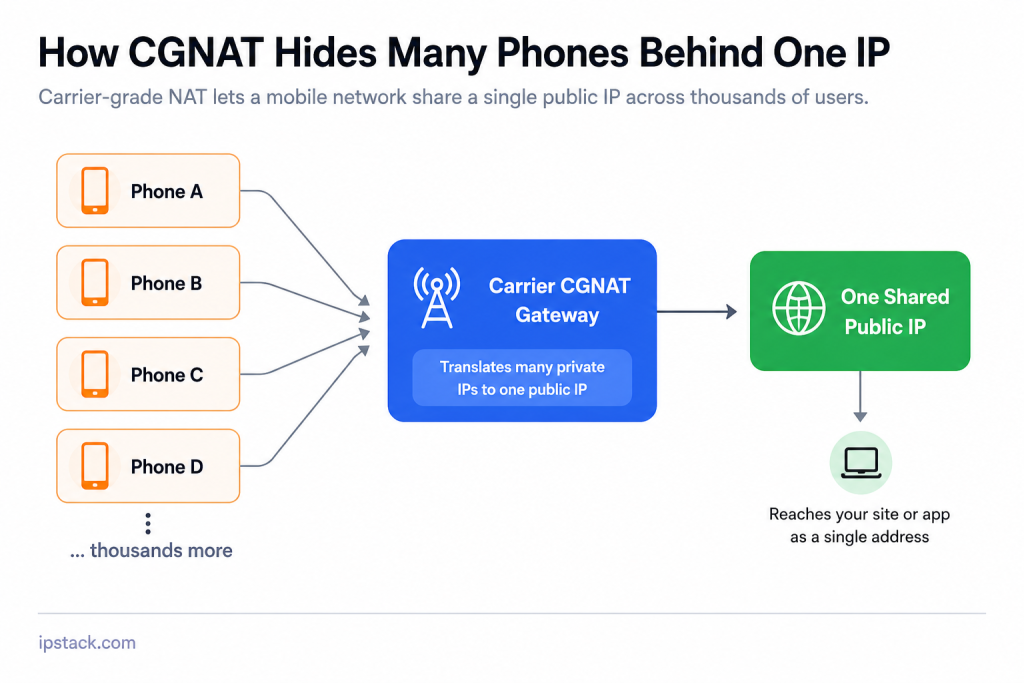
Mobile IPs can also make IP-based geolocation less precise. The carrier gateway may be located in a different city or region from the device actually making the request. For that reason, mobile connection type is useful context, but it shouldn’t be treated as proof of either a user’s identity or exact location.
Knowing what each connection type tends to mean is only half the picture. The next question is how you identify that type reliably in the first place.
How Type Is Identified: ASN Classification in Plain Words
Every IP address belongs to a network, and that network is associated with an ASN, short for Autonomous System Number. Think of an ASN as an identifier for a network operator that announces and manages a block of IP addresses, whether that’s a cloud provider, broadband ISP, or mobile carrier.
IP intelligence services use ASN and network information to classify the connection behind an IP. As described in IPstack’s introductory guide to IP geolocation, the connection type field identifies the nature of the connection, such as broadband or mobile access. IPstack’s own team has also described this classification in terms of physical connection types like DSL, cable, and fiber, derived from ASN analysis.
Here’s what a lookup response looks like structurally:
{
  "ip": "134.201.250.155",
  "type": "ipv4",
  "continent_name": "North America",
  "country_name": "United States",
  "region_name": "California",
  "city": "Los Angeles",
  "connection_type": "broadband"
  "connection": {
    "asn": 25876,
    "isp": "Los Angeles Department of Water & Power",
  }
}
The connection_type field is the one to look for. Note that the Connection module is part of IPstack’s paid plans and isn’t included on the Free tier.
See the real-time IP lookup API to explore the response and start working with these signals in your application.
Once you can identify the connection type, the next question is what you should actually do with it.
Policy by Type: A Starter Matrix
Knowing the connection type is only useful if it changes what your system does next. Here’s a simple starting matrix, followed by a small function that puts it into code.
Connection Type | Suggested Action | Why |
Residential | Allow | Commonly associated with consumer networks |
Mobile | Allow, avoid hard IP blocks | Many users can share the same IP through CGNAT |
Datacenter | Review or verify | More commonly associated with servers, bots, proxies, and automated traffic |
This is a starting point, not a fixed rule. Adjust it based on what your product actually needs. A content site might treat all three types the same. A payment flow might add an extra verification step for datacenter traffic while leaving residential and mobile traffic unchanged.
Here’s a small function that turns this matrix into working logic:
function getPolicyAction(connectionType) {
  const policy = {
    residential: "allow",
    mobile: "allow",
    datacenter: "review",
  };

  return policy[connectionType] || "review";
}

// Example usage
const type = lookupResponse.connection.connection_type;
const action = getPolicyAction(type);

if (action === "review") {
  flagForManualCheck(lookupResponse.ip);
}
That’s enough to make connection type part of an actual decision instead of leaving it unused in the lookup response. The important part is not the exact policy above, but having a clear rule for what your application does with each type.
Conclusion
Three IPs can point to the same city and still tell very different stories. A datacenter IP may indicate traffic coming from hosted infrastructure. A residential IP is typically associated with a home ISP. A mobile IP may be shared by many users through a carrier network. None of these signals are definitive on their own, but each adds useful context when you’re deciding how to handle a request.
Connection type can appear alongside standard location data in an IP lookup response. If your current checks only consider country or city, adding connection type gives you another useful signal for personalization, fraud screening, and traffic analysis.
The key is to use it as one input in a broader decision, rather than treating the IP type itself as a verdict.
Frequently asked questions
Is a datacenter IP always a bot?
No. Legitimate traffic can also come from datacenter networks, including monitoring services, business infrastructure, VPNs, and automated tools. Treat a datacenter classification as a signal to look closer, not as a reason to block automatically.
Can two people share the same residential IP?
Yes. Everyone using the same home router typically shares its public residential IP, so one address can represent multiple people and devices.
What is the difference between a datacenter IP vs residential IP?
A datacenter IP is typically associated with servers, cloud providers, or hosted infrastructure, while a residential IP is usually assigned through a home internet provider. The difference can provide useful context about the type of traffic behind a request, but neither classification is proof of who is using the connection.
Why does a mobile IP sometimes show the wrong city?
Mobile carriers can route traffic through CGNAT gateways located somewhere different from the user’s actual location. The IP-based location therefore reflects the network gateway rather than the precise location of the device.
Does connection type replace fraud detection?
No. Connection type is one signal among several. For higher-stakes decisions, combine it with other signals such as login behaviour, request patterns, device information, and transaction details.
Where does the connection type come from?
IP intelligence services use network information such as ASN and ISP ownership, along with their classification data, to determine the likely connection type. The result can then be returned directly as part of an IP lookup, so your application doesn’t need to research the network manually.
Try ipstack free
IP-to-location, ASN, ISP, time zone and threat data from one endpoint. Get a key and make your first call in under a minute.

Karam Alsalhani
All articles by Karam →