Every time you visit a website, your device sends an IP address along with the request. That IP address can help a website determine your approximate country, city, and internet provider. An IP tracker can use this information to understand where a connection appears to originate. That might sound like a lot, but an IP address reveals much less than most people think.
This guide breaks down what IP tracking really is, what it can and cannot show, and where the legal line sits. Just a straightforward look at what happens and why.
Key Takeaways
- An IP address can reveal your general location, but not your exact address.
- An IP address cannot identify you by name on its own.
- Businesses use IP data for fraud checks, content rules, localisation, and analytics.
- Basic IP lookups are generally legal, but storing and using IP data can come with privacy and data protection obligations.
- Tools like a free IP lookup let you see what information an IP lookup can actually return, rather than relying on assumptions.
Let’s look at the basics before we go deeper into each part.
Short Answer: What IP Tracking is and What it Reveals
IP tracking means using an IP address to learn information about the network behind a connection. An IP tracker can use an IP lookup to return details such as country, region, city, and internet provider. You generally do not get a person’s name or identity from the IP address alone.
Think of an IP address like a return address on a letter. It can give you an idea of where the letter came from, but it does not tell you who wrote it. A lookup for an IP address such as 134.201.250.155 might return Los Angeles, California, along with information about the network or connection type. It won’t tell you who is using that connection.
This is where IP tracking is often misunderstood. An IP address can provide useful signals about a connection and its approximate location, but it is not an identity lookup. That makes it useful for tasks such as localisation, analytics, and fraud detection, while limiting what it can tell you about the individual behind the connection.
Now that the basic idea is clear, let’s look at how IP tracking works in practice and what the data can actually reveal.
What IP Tracking Can and Cannot Reveal
IP tracking starts with the IP address your device sends when you connect to a website. That address can then be looked up against IP geolocation and network databases.
This is where a lot of confusion comes from. People often assume an IP address works like GPS. It doesn’t.
Here’s a clearer breakdown:
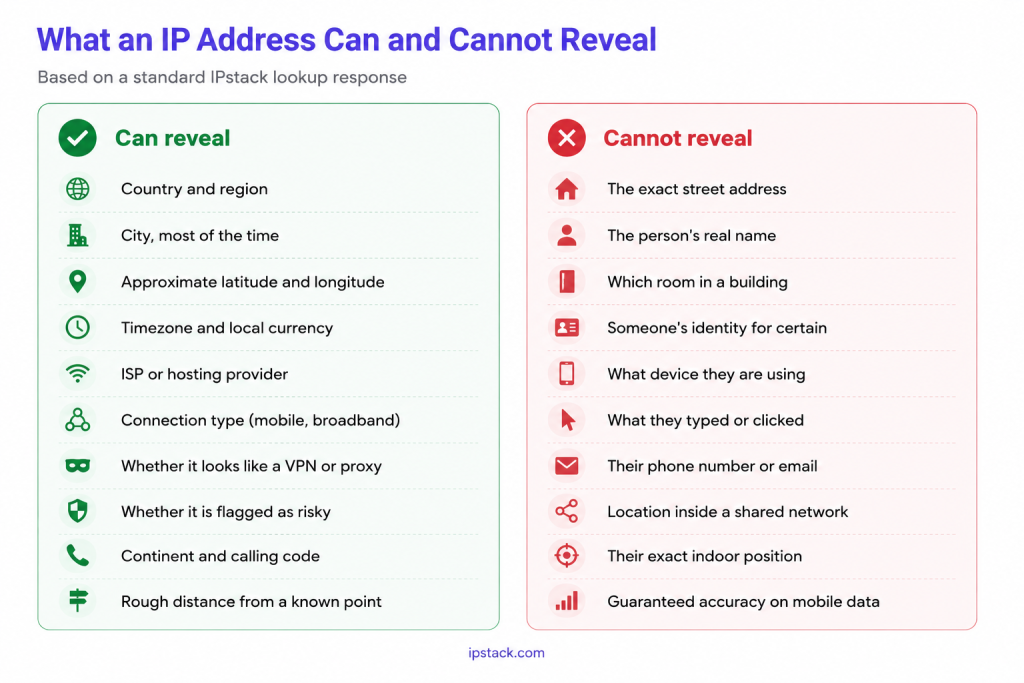
An IP lookup service like IPstack can return structured information about an IP’s location, network, connection, and security signals. Here’s an example response from the IPstack documentation for the IP 134.201.250.155:
{
  "ip": "134.201.250.155",
  "hostname": "134.201.250.155",
  "type": "ipv4",
  "continent_code": "NA",
  "continent_name": "North America",
  "country_code": "US",
  "country_name": "United States",
  "region_code": "CA",
  "region_name": "California",
  "city": "Los Angeles",
  "zip": "90013",
  "latitude": 34.0655,
  "longitude": -118.2405,
  "msa": "31100",
  "dma": "803",
  "radius": null,
  "ip_routing_type": null,
  "connection_type": null,
  "location": {
    "geoname_id": 5368361,
    "capital": "Washington D.C.",
    "languages": [
        {
          "code": "en",
          "name": "English",
          "native": "English"
        }
    ],
    "country_flag": "",
    "country_flag_emoji": "🇺🇸",
    "country_flag_emoji_unicode": "U+1F1FA U+1F1F8",
    "calling_code": "1",
    "is_eu": false
  },
  "time_zone": {
    "id": "America/Los_Angeles",
    "current_time": "2024-06-14T01:45:35-07:00",
    "gmt_offset": -25200,
    "code": "PDT",
    "is_daylight_saving": true
  },
  "currency": {
    "code": "USD",
    "name": "US Dollar",
    "plural": "US dollars",
    "symbol": "","symbolnative":""
  },
  "connection": {
    "asn": 25876,
    "isp": "Los Angeles Department of Water & Power",
    "sld": "ladwp",
    "tld": "com",
    "carrier": "los angeles department of water & power",
    "home": null,
    "organization_type": null,
    "isic_code": null,
    "naics_code": null
  },
  "security": {
    "is_proxy": false,
    "proxy_type": null,
    "is_crawler": false,
    "crawler_name": null,
    "crawler_type": null,
    "is_tor": false,
    "threat_level": "low",
    "threat_types": null,
    "proxy_last_detected": null,
    "proxy_level": null,
    "vpn_service": null,
    "anonymizer_status": null,
    "hosting_facility": false
  }
}
Look at what this response actually contains. It can provide approximate geographic information, network and ISP details, time zone and currency information, and security-related signals such as whether the IP is associated with a proxy, crawler, Tor, or hosting facility.
But there is still no person’s name, email address, or other direct identity information in the response. The data describes the IP and its associated network, not the individual using the connection.
That’s the important distinction. An IP lookup can provide useful signals for localisation, analytics, security, and fraud detection, but it doesn’t turn an IP address into a person’s identity.
Myth vs Fact
Here’s a quick reality check on some of the most common claims people make about IP tracking:
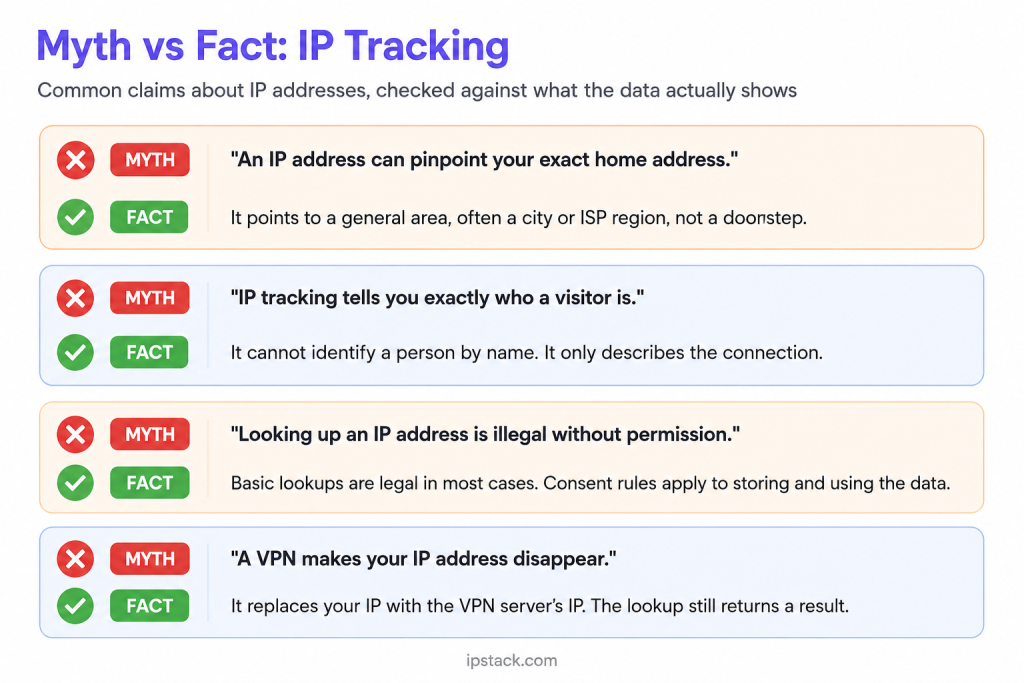
Looking at the actual data makes the limits of IP tracking much clearer. But if an IP address can’t identify someone on its own, why do businesses use IP data at all? The value comes from the signals it can provide, not from trying to turn an IP address into a person’s identity.
How Businesses Use it Legitimately
Businesses can use IP tracking to get signals about approximate location or network risk, rather than trying to identify a person.
Common uses include:
- Fraud checks: A login from an unexpected country can trigger additional verification.
- Content rules: Streaming platforms and other services can use country information to apply regional access rules and licensing restrictions.
- Currency and language: A shopping site can use a visitor’s country to suggest a local currency or language.
- Analytics: Teams can use country and region data to understand where their traffic comes from.
- Security: Repeated failed logins from the same IP or network range can be a signal of suspicious activity.
None of these use cases requires knowing who the person is. They need a signal about where a connection appears to originate and whether its characteristics look unusual. A payment system, for example, might compare the country associated with an IP with other transaction signals, such as billing or account information. A mismatch does not prove fraud, but it can provide additional context for a broader risk assessment.
This is why IP data works best when paired with other signals rather than used on its own. An IP flag rarely tells the whole story. It adds context to a decision that may already consider account activity, device information, transaction details, and other risk signals.
That difference becomes especially important when you get into the legal side.
Is IP Tracking Legal? Privacy and Consent
This section covers general information, not legal advice. For anything specific to your business, talk to a legal professional.
Using an IP address for legitimate purposes is generally not prohibited, but the privacy obligations depend on what you do with the data, where your users are located, and which laws apply. The legal questions become more important when you store IP addresses, combine them with other information, or use them to build profiles about individuals.
Under regulations such as the GDPR, an IP address can be personal data when it can be linked, directly or indirectly, to an identifiable person. That means businesses need to consider things such as:
- A one-time lookup: Using an IP to estimate a visitor’s location or apply a security check can be a legitimate use, but the appropriate legal basis depends on the purpose and circumstances.
- Long-term storage: Keeping IP addresses alongside browsing activity or account information creates a more detailed record and requires appropriate safeguards, a defined purpose, and a valid legal basis.
- Profiling and advertising: Using IP data as part of behavioural profiling or targeted advertising can trigger additional privacy and consent requirements, depending on the jurisdiction and the other technologies involved.
The important distinction is between using an IP as part of a specific request and building a persistent record of someone’s activity. The latter generally creates greater privacy obligations because the IP is being combined with information over time.
Other privacy laws take different approaches. For example, California’s CCPA/CPRA can treat an IP address as personal information when it is reasonably capable of being associated with a particular consumer or household. The exact requirements vary by jurisdiction and by what the business does with the data.
So the practical takeaway is simple: don’t assume that an IP lookup is either automatically harmless or automatically unlawful. Consider what you’re collecting, why you’re collecting it, whether you’re storing it, what you combine it with, and which privacy laws apply to your users.
How to Look Up an IP Responsibly
If you are adding an IP-based feature to a product, a few habits can help keep your data use proportionate:
- Only collect what you need: If you only need a country for currency display, avoid collecting or retaining more IP data than the feature requires.
- Set a retention limit: Keep IP logs only for as long as you have a legitimate reason to retain them, then delete or anonymise them where appropriate.
- Be transparent: Explain in your privacy policy how and why your product uses IP-based information.
- Use a reliable source: A structured IP lookup API can provide consistent location and network data instead of relying on incomplete or outdated datasets.
- Test before you launch: Run lookups against known IPs and confirm that the fields and classifications match what your application expects.
If you want to see what an IP lookup response actually contains before building anything, a free lookup tool is a simple way to explore the available data for yourself.
Conclusion
IP tracking sounds more powerful than it actually is. An IP tracker can provide an approximate location and information about the associated network, but it cannot identify a person or reveal their exact address. Used responsibly, IP data can support fraud checks, content rules, localisation, and analytics without becoming invasive.
If you want to see this in action, try a free IP lookup and examine the fields it returns. It’s a simple way to understand what IP data can actually tell you and separate the facts from the common assumptions.
Frequently asked questions
Is IP tracking the same as GPS tracking?
No. GPS can provide much more precise location data, while IP geolocation estimates location from network information. IP-based results can be reasonably accurate at the country level but may be much less precise at the city level.
Can someone find my home address from my IP?
Not directly. A standard IP lookup generally provides an approximate location and network information, not a street address. An internet service provider may have records connecting an IP address to a subscriber, but access to those records is subject to applicable laws and legal processes.
What does an IP tracker show?
An IP tracker can typically show information such as approximate location, ISP or network details, and other signals associated with an IP address. It generally cannot identify the person using the connection by name.
Does a VPN stop IP tracking completely?
No. It changes which IP address is visible to the website. An IP lookup will generally return information about the VPN server or network rather than the user’s original connection. Other tracking methods can still exist outside the IP address itself.
Is IP geolocation always accurate?
No. IP geolocation is an estimate, not a precise location service. Country-level results are generally more reliable than city-level results, while mobile, VPN, proxy, and satellite connections can make results less precise.
Do I need consent just to look up an IP address?
There is no universal yes-or-no answer. It depends on the jurisdiction, purpose, and how you use or store the IP data. A one-time lookup can have different requirements from long-term profiling.
Try ipstack free
IP-to-location, ASN, ISP, time zone and threat data from one endpoint. Get a key and make your first call in under a minute.

Karam Alsalhani
All articles by Karam →