Server logs already have the raw material. The part that usually slows people down is everything after that: parsing lines, extracting IPs, calling an API, handling quotas, and formatting the output into something a human can scan.
The IPstack MCP server removes that loop. Your AI assistant can call IPstack directly, so IP geolocation and threat checks happen in the same prompt you use to read the logs.
That matters now because log analysis is getting larger, faster, and more manual than it should be. If you are a DevOps engineer or backend developer, you should not need a script just to answer a basic question like: which IPs hit this endpoint, where did they come from, and are any of them proxies, VPNs, or Tor exit nodes?
How do we geolocate IPs from server logs without a script?
Connect the IPstack MCP server to your assistant once, paste the logs, and ask for a structured lookup. MCP stands for Model Context Protocol, a standard way to expose tools and data sources to an AI assistant so the model can call structured endpoints instead of guessing through raw HTTP requests.
With IPstack, that means your assistant can enrich each IP with city, country, ISP, ASN, timezone, and on the right plan, security fields for proxy, VPN, and Tor detection. The assistant does the orchestration; IPstack does the lookup.
The setup takes one copy-paste. Sign up for a free IPstack account to get your API key, then drop the config block below into your AI client. The MCP user guide walks through every option; the IPstack MCP landing page has the full feature overview.
Connect the IPstack MCP server
Paste this JSON into an MCP-capable client like Claude Desktop or Cursor. MCP itself is just the access layer — you still pay for IPstack usage based on your plan, and the model can call the service without any extra wrapper code.
					{
 "mcpServers": {
   "apilayer": {
     "args": [
       "@apilayer/mcp-server"
     ],
     "command": "npx",
     "env": {
       "APILAYER_ACCESS_KEY": "your_api_key_here"
     }
   }
 }
}
IPstack supports both IPv4 and IPv6 addresses. The MCP server is built for batch lookups, the landing page notes you can resolve up to 50 IPs in one call, which covers a typical log slice without burning through quota.
Paste the logs, then ask for the answer
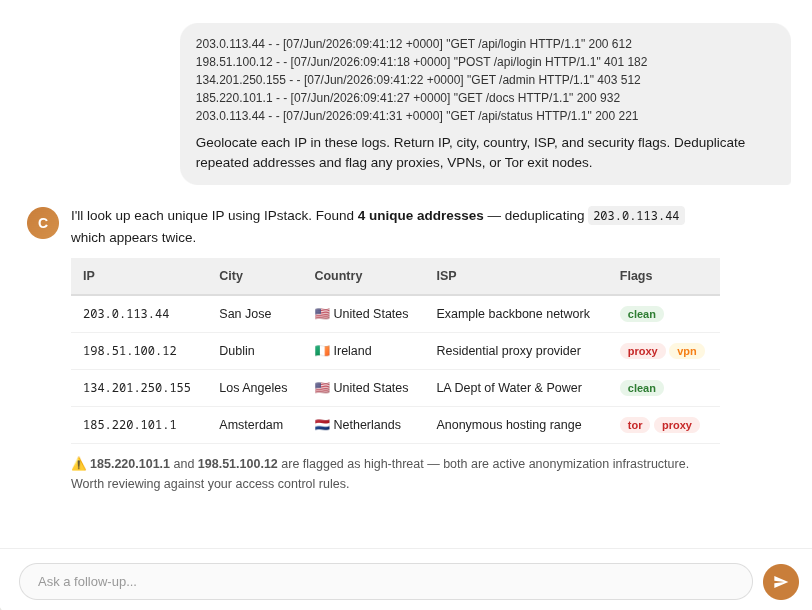
Once the MCP server is connected, drop a block of log lines into the chat. This is the kind of input you can work with right away:
					203.0.113.44 			- - [07/Jun/2026:09:41:12 +0000] "GET /api/login HTTP/1.1" 			200 612 "-" "Mozilla/5.0"
198.51.100.12 			- - [07/Jun/2026:09:41:18 +0000] "POST /api/login HTTP/1.1" 			401 182 "-" "Mozilla/5.0"
134.201.250.155 			- - [07/Jun/2026:09:41:22 +0000] "GET /admin HTTP/1.1" 			403 512 "-" "curl/8.5.0"
185.220.101.1 			- - [07/Jun/2026:09:41:27 +0000] "GET /docs HTTP/1.1" 			200 932 "-" "Mozilla/5.0"
203.0.113.44 			- - [07/Jun/2026:09:41:31 +0000] "GET /api/status HTTP/1.1" 			200 221 "-" "Mozilla/5.0"
Give the assistant a direct instruction that leaves no room for interpretation. Specific prompts return structured tables; vague ones return paragraphs you still have to parse yourself.
					Geolocate each IP in these logs. Return IP, city, country, ISP, and security flags.
Deduplicate repeated addresses and flag any proxies, VPNs, or Tor exit nodes.
The response comes back as something you can scan in seconds. The assistant deduplicates repeated IPs automatically, so a busy endpoint with one noisy source only costs one lookup.
What does the raw IPstack response look like?
The assistant is not inventing the answer. It is reading the IPstack response and formatting it for you. On the free tier, you get standard geolocation fields. On Professional and higher, the same lookup can include the security module that flags proxy, VPN, and Tor activity.
Here is a representative response shape for a suspicious IP with the security module enabled. This shows the exact fields your assistant reads to produce the threat flag summary above.
					{
 "city": "Amsterdam",
 "connection": {
   "asn": 14061,
   "carrier": "digitalocean",
   "home": null,
   "isic_code": null,
   "isp": "DigitalOcean, LLC",
   "naics_code": null,
   "organization_type": null,
   "sld": "digitalocean",
   "tld": "com"
 },
 "continent_code": "EU",
 "continent_name": "Europe",
 "country_code": "NL",
 "country_name": "Netherlands",
 "hostname": "185.220.101.1",
 "ip": "185.220.101.1",
 "latitude": 52.3676,
 "location": {
   "calling_code": "31",
   "country_flag": "https://assets.ipstack.com/images/assets/flags_svg/nl.svg",
   "country_flag_emoji": "🇳🇱",
   "geoname_id": 2759794,
   "is_eu": true
 },
 "longitude": 4.9041,
 "region_code": "NH",
 "region_name": "North Holland",
 "security": {
   "anonymizer_status": "active",
   "crawler_name": null,
   "crawler_type": null,
   "hosting_facility": true,
   "is_crawler": false,
   "is_proxy": true,
   "is_tor": true,
   "proxy_last_detected": "2026-06-07T09:41:27+00:00",
   "proxy_level": "high",
   "proxy_type": "tor",
   "threat_level": "high",
   "threat_types": [
     "tor",
     "anonymizer"
   ],
   "vpn_service": null
 },
 "type": "ipv4",
 "zip": "1000"
}
That is the part that matters for security work. The assistant can turn one lookup into an immediate judgment call: clean traffic, suspicious infrastructure, or a likely anonymized path that deserves a closer look.
What are the limits?
IPstack bills against monthly request quotas, and the API returns a usage_limit_reached error when you exhaust the plan allowance. Bulk lookup is capped at 50 IPs per request, so target focused log slices, not a full month of traffic at once.
Standard geolocation works on the free tier and is enough to validate the workflow. The security module i.e., proxy, VPN, and Tor detection etc. requires Professional or higher. Move up when the security use case justifies it.
That split is the right one for most teams. Geo lookup is the baseline. Threat intelligence is the premium layer you turn on when the data starts affecting access control, fraud review, or incident response.
Frequently asked questions
Does this work with any AI assistant?
Yes. Any MCP-compatible client works, including Claude Desktop and Cursor.
Is proxy and VPN detection included on the free tier?
No. Proxy, VPN, and Tor detection require a Professional plan; standard geolocation is free.
How many IPs can I look up at once?
Up to 50 IPs per request; the assistant deduplicates, so repeated IPs only count once.
What log formats does this support?
Any format you can paste as text. Nginx, Apache, JSON logs, or raw access dumps.
Try ipstack free
IP-to-location, ASN, ISP, time zone and threat data from one endpoint. Get a key and make your first call in under a minute.

Karam Alsalhani
All articles by Karam →