You have two IP geolocation providers on your shortlist. Both return a country, city and coordinates, so at first glance they look alike. If you’re weighing ipstack as an ip2location alternative, the real decision is about delivery: IP2Location sells both a hosted API, IP2Location.io, and downloadable databases you host yourself, while ipstack is a hosted API only.
The other differences show up in the plans. ISP, ASN and security data sit at different price points with each provider.
This guide compares the two on the data developers usually need: location fields, ISP and ASN details, and security signals. You’ll get a side-by-side table, guidance on when to choose each, a test plan you can run on your own traffic, and a migration example.
One note before we start: IP2Location’s older Web Service (api.ip2location.com/v2, credit-based) no longer accepts new registrations and points users to IP2Location.io (IP2Location). This comparison uses IP2Location.io and the downloadable databases, not the legacy service. Other providers, such as ipdata and ipgeolocation.io, are covered in a separate multi-provider comparison.
All prices and plan details were checked on November 18, 2026.
ipstack vs IP2Location at a Glance
ipstack is a hosted IP geolocation API that returns location, time zone, currency and connection data from its $12.99 Basic plan. IP2Location offers both an API (IP2Location.io) and downloadable databases, plus a larger free tier. Choose ipstack for one hosted API, and IP2Location for self-hosting or extra fields.
- Pick ipstack if you want one hosted call for location, time zone, currency, ASN and ISP from $12.99 a month, plus proxy and threat signals bundled with 2 million requests on Professional Plus.
- Pick IP2Location if you need offline lookups from a downloadable database, a 50,000-query free API tier, or fields such as usage type, elevation and MCC and MNC.
- Before you commit, test both on a sample of your own IPs and price your real monthly volume on each plan.
What to Compare Before You Choose
The comparison uses fields and prices listed on each provider’s own documentation and pricing pages. If a figure couldn’t be verified from the source, it’s left out. These are the criteria, and why each one matters:
- Data fields. Developers need to know which fields arrive in one call, and which plan unlocks them.
- Network metadata. ASN and ISP data feed routing, analytics and B2B enrichment.
- Security and proxy signals. Fraud teams use proxy, VPN and Tor flags to decide what to block or review.
- Delivery model. An API removes maintenance work, while a downloadable database keeps lookups inside your network.
- Performance and hosting. A network call adds latency, and a local database moves that cost to your own servers.
- Pricing at your volume. Product teams need the monthly cost at the lookup volume they actually run.
- Free tier. A free plan decides how far you can test before you pay.
- Licence terms. Commercial-use and attribution rules decide whether a free tier can go to production.
Before you compare, write down two things: your monthly lookup volume and the fields your code actually uses. Both drive the price you’ll pay.
What should I look for when choosing an IP geolocation API?
Start with the fields you need, such as country, city, time zone, ASN or proxy flags, and check which plan includes each one. Then compare the delivery model (hosted API or self-hosted database), the price at your monthly volume, the free tier and licence terms, and test accuracy on your own IP addresses.
Here’s how the two providers compare on each of these criteria.
Side-by-Side Comparison
The table below sums up the main differences. The sections under it give the field names, plans and sources behind each row.
ipstack vs IP2Location, as of November 18, 2026
Criterion | ipstack | IP2Location |
Data fields | Location, time zone (Olson ID) and currency in one call; time zone and currency from Basic | Location on Free; ISP, usage type and elevation from Starter; mobile fields from Plus |
Network metadata | connection.asn (integer) and connection.isp from Basic ($12.99) | asn (string) and as on Free; isp from Starter ($49) |
Security and proxy detection | Security Module (is_proxy, is_tor, vpn_service, threat_level) on Professional Plus ($99.99) | Open proxies (PUB) on Free and Starter; VPN and Tor on Plus; proxy object and fraud_score on Security ($499) |
Delivery model | Hosted API only | IP2Location.io API, or downloadable databases (DB1 to DB26, free LITE) |
Performance and hosting | Network call; vendor states results within milliseconds and 99.9% uptime | API is a network call; a self-hosted database runs on your own servers |
Pricing model | Monthly plans from $12.99 (50,000) to $99.99 (2,000,000); overage after 100% | Monthly API plans from $49 (150,000) to $499 (600,000); overage in blocks; databases licensed per year |
Free tier | 100 requests a month, location only, HTTPS included | 50,000 queries a month with attribution; free LITE databases |
Licence | Commercial use from Basic; not on Free | Free API needs attribution; LITE is free with attribution (CC BY-SA 4.0) |
Location and Data Fields
Beyond country and city, the two APIs return different extras.
ipstack returns country_code, region_name, city, zip, latitude and longitude, plus a location object with capital, languages, calling_code, is_eu and flag. From the Basic plan, it adds a time_zone object (id, current_time, gmt_offset, is_daylight_saving) and a currency object (code, name, symbol). It returns JSON or XML, supports IPv4 and IPv6, offers a fields parameter to trim the response, an optional hostname=1 lookup, and 8 response languages.
IP2Location.io’s Free plan returns country_code, country_name, region_name, city_name, latitude, longitude, zip_code, time_zone, asn, as and is_proxy. Starter adds isp, domain, net_speed, idd_code, area_code, weather station, elevation and usage_type. Plus adds mobile fields (mcc, mnc, mobile_brand), address_type and a country object that includes currency. For the complete field definitions and plan availability, see the IP2Location.io API documentation
Note the time zone format. IP2Location.io’s time_zone is a UTC offset string such as -07:00, and the Olson ID is only in the Plus plan’s time_zone_info object. ipstack returns the Olson ID, such as America/Los_Angeles, in time_zone.id from its Basic plan.
To be fair, IP2Location offers some fields ipstack doesn’t list, such as elevation, weather station, usage type, MCC and MNC, and district.
IP2Location publishes per-country accuracy figures on its data accuracy page, measured as the share of IPs placed within 50 miles of the right city, and notes that it can’t guarantee them. These are vendor figures, not independent results, and real accuracy varies by IP address, ISP routing and network type.
Keep in mind that IP-based latitude and longitude usually point to a city or network location, not a street address. City-level results also depend on local ISP routing and mobile carrier NAT, so treat them as approximate when you test.
ipstack returns country_code, city, latitude, and longitude on its Free plan. Here’s a Python example that makes one request and returns only these fields:
					import os
import requests

api_url = "https://api.ipstack.com/"

def lookup(ip: str, **options) -> dict:
    params = {"access_key": os.environ["IPSTACK_KEY"], **options}
    response = requests.get(api_url + ip, params=params, timeout=10)
    response.raise_for_status()
    data = response.json()

    if data.get("error"):
        raise ValueError(data["error"].get("info", "ipstack request failed"))
    return data

data = lookup("134.201.250.155", fields="ip,country_code,city,latitude,longitude")
print(data)
The above code provides the following response:
					{
  "ip": "134.201.250.155",
  "country_code": "US",
  "city": "Los Angeles",
  "latitude": 34.0453,
  "longitude": -118.2413
}
The Free plan includes 100 requests per month, so you’ll need to keep your test sample small. Even testing 20 IP addresses with known locations can give you a better idea of how the API performs.
Which IP geolocation API supports IPv6?
Both do. ipstack and IP2Location.io both document IPv4 and IPv6 lookups, and IP2Location’s downloadable databases come in IPv4 and IPv6 versions. Include IPv6 addresses in your own test, because coverage can differ by network.
Location data is just one part of an IP lookup. You might also need information about the network behind an IP address.
Network Metadata: ASN, ISP and Connection Type
Let’s compare where you can find ISP and ASN information in both APIs and which plans include these fields.
ipstack returns both ASN and ISP information inside the connection object. The Connection Module is available from the Basic plan ($12.99 per month), and these fields aren’t included in the Free plan.
IP2Location.io returns asn and as (the AS name) on its Free plan, according to its documentation. The Starter plan ($49 per month) adds isp, domain, and usage_type. Its Security plan also includes an as_info object with the AS number, name, domain, and CIDR.
If you only need ASN data, IP2Location.io’s Free plan includes it. If you also need the ISP name, compare the starting prices: $12.99 on ipstack and $49 on IP2Location.io.
Once you’re on a paid ipstack plan, you can access both fields with just a few lines of Python:
					data = lookup("134.201.250.155")
connection = data.get("connection") or {}
print(connection.get("asn"), connection.get("isp"))
One thing to keep in mind: always treat nested objects as optional. If your plan doesn’t include a particular module, the API won’t return those fields.
Watch the data types too. IP2Location.io returns asn as a string, while ipstack returns connection.asn as an integer. Convert one of them before you compare or store them together.
If you use IP2Location’s downloadable databases instead of the API, ISP, domain, usage type and ASN sit in specific database tiers. For example, DB2 adds ISP, DB23 adds usage type, and DB26 adds ASN and district (IP2Location databases).
Best IP geolocation API that returns ISP and ASN data
For ISP and ASN together at the lowest published price, ipstack’s Basic plan ($12.99 a month) returns both in the connection object, along with organization type and carrier. IP2Location.io returns ASN on its Free plan, but ISP starts on Starter ($49).
Network data tells you who manages an IP address. Security data helps you understand whether that IP might be risky.
Security and Proxy Detection
Both providers offer proxy information and risk signals, but the available fields and plan requirements are different. ipstack returns its security data inside a security object on the Professional Plus plan ($99.99 per month). IP2Location.io includes basic proxy detection on its Free plan and offers additional security data on higher plans.
ipstack provides security fields such as is_proxy, proxy_type, is_tor, is_crawler, threat_level, and threat_types. To get these fields, add security=1 to your request:
					data = lookup("134.201.250.155", security=1)
security = data.get("security") or {}
print(security.get("is_proxy"), security.get("threat_level"), security.get("threat_types"))
IP2Location.io returns a fraud_score between 0 and 99, along with a proxy object, on its Security plan ($499 per month). This object includes proxy_type, threat (SPAM, SCANNER, BOTNET, or BOGON), provider, and specific VPN and Tor flags: proxy.is_vpn and proxy.is_tor.
According to its pricing page, IP2Location.io includes open proxy detection (PUB) on its Free and Starter plans. It offers additional levels of proxy detection on higher plans. However, the specific proxy.is_vpn and proxy.is_tor fields are documented under the Security plan.
The two providers handle risk signals differently. ipstack returns a threat_level value along with a list of threat_types. IP2Location.io uses a numerical fraud_score.
Your choice depends on how you plan to use this data. For example, you could block an IP when its threat_level is high with ipstack. With IP2Location.io, you could send an IP for review when its fraud_score crosses a threshold you set.
ipstack’s Security Module returns more than the fields above: is_proxy, proxy_type, is_crawler, crawler_name, crawler_type, is_tor, threat_level, threat_types, proxy_last_detected, proxy_level, vpn_service, anonymizer_status and hosting_facility. Calling it without security=1, or on a plan without the module, returns error 301. See the security module documentation for details.
IP2Location also sells proxy data as a separate database line, IP2Proxy, with a free IP2Proxy LITE version for open proxies.
On price, ipstack bundles its security signals with 2 million requests at $99.99 a month. IP2Location.io’s full proxy coverage is on Plus ($249) and Security ($499). Compare that against the depth of data each one returns.
Does ipstack’s VPN and proxy detection actually work?
It returns the proxy, VPN, Tor and threat fields documented for the Security Module, but like all IP-based detection it’s probabilistic. New VPN exits and residential proxies can be missed, and shared IPs can be flagged. Test it on IPs you already know, and read how VPN and proxy detection works before you block traffic on it alone.
Delivery Model: API vs Downloadable Database
This is the biggest difference between the two providers.
ipstack is API only. You call https://api.ipstack.com/{ip} for a single lookup, pass up to 50 comma-separated IPs for a bulk lookup, or call /check to look up the requester’s own IP.
IP2Location gives you a choice. You can call the IP2Location.io API, or download an ip geolocation database and host it yourself: the commercial DB1 to DB26 range, or the free LITE databases. LITE files come in BIN, CSV, CIDR and MMDB formats (MMDB for IPv4 only), for IPv4 and IPv6.
The trade-off is simple. A database gives you local lookups with no per-request cost, but you own the update pipeline, storage and serving. An API removes that work, but adds a network call and per-request pricing. Our post on IP geolocation database vs API costs goes into the numbers.
Should I use an IP geolocation API or a downloadable IP database?
Use a database if you need offline lookups, very high volume with no per-request cost, or data that stays inside your own network, and you can maintain the update process. Use an API if you’d rather not run that pipeline and want fresh data from one HTTP call.
I’m moving our stack from self-hosted GeoIP files to a cloud API for fresher data – which provider updates its data most frequently?
Neither ipstack nor IP2Location.io publishes an API data refresh schedule that you can compare directly, so check with each provider before you decide. A hosted API removes your own update lag, because you always query the provider’s current data. That’s usually the biggest freshness gain over self-hosted files.
Performance and Hosting
ipstack’s documentation describes results within milliseconds and 99.9% uptime. These are vendor statements, and the docs note that hostname=1 can increase response times. A self-hosted IP2Location database removes the network call, so its latency depends on your own servers. The IP2Location.io API is a network call, like ipstack. Measure both with the test plan below rather than relying on published figures.
Pricing, Free Tier and Licence
Here’s how the two compare on cost, using only published plan prices from each provider’s pricing page.
ipstack: Free is $0 for 100 requests a month; Basic is $12.99 for 50,000; Professional is $59.99 for 500,000; Professional Plus is $99.99 for 2,000,000. Yearly billing saves up to 15%. HTTPS is included on every plan, commercial use starts on Basic, and the bulk endpoint and Security Module are on Professional Plus. See the ipstack pricing plans for current details.
IP2Location.io: Free is $0 for 50,000 queries a month with attribution required and no overage; Starter is $49 for 150,000; Plus is $249 for 300,000; Security is $499 for 600,000. Paid overage is sold in blocks: $10 per 30,000 extra queries on Starter, $50 per 60,000 on Plus and $100 per 120,000 on Security. You can turn overage off or set a maximum in your account, and the pricing page lists Bulk Query on the paid plans. See the IP2Location.io pricing page for current plan allowances and overage rates.
IP2Location’s databases are licensed per database per year. For example, DB1 costs $99 a year with a Standard License for internal use, or $980 a year with a Site License for unlimited servers. DB19 to DB26 are quote only. The free LITE databases can be used for personal or commercial use with attribution, and IP2Location describes their accuracy as limited.
Here’s a worked example of ip geolocation api pricing at three volumes, using only published plan and overage prices:
Monthly lookups | ipstack | IP2Location.io |
50,000 | $12.99 (Basic) | $0 (Free, attribution required) |
500,000 | $59.99 (Professional) | From $169 (Starter + 12 overage blocks); $449 on Plus with overages |
2,000,000 | $99.99 (Professional Plus) | From $669 (Starter + 62 overage blocks); $1,699 on Security with overages |
These are illustrative costs based on published plan allowances and overage rates, assuming the required additional queries can be purchased. The lowest-cost plan may not include every field your application needs. Compare plan features alongside query volume, particularly if you require VPN detection, proxy intelligence or fraud scores. For a deeper per-lookup breakdown, see what you actually pay per IP lookup.
How do IP geolocation APIs charge – per request or monthly plans?
Most, including ipstack and IP2Location.io, sell monthly plans with a request quota. ipstack charges overage fees after you use 100% of your allowance, with email alerts at 75%, 90% and 100%. IP2Location.io sells paid overage in blocks, and you can turn it off or set a maximum in your account.
Do IP geolocation providers charge extra for HTTPS or bulk lookups?
ipstack includes HTTPS on every plan, including Free, but bulk lookup is only on Professional Plus. IP2Location.io offers bulk queries from its Starter plan. Check each pricing page, because these features are often tied to plan tiers rather than charged separately.
Is it cheaper to buy an IP database or pay for an API?
At high volume, a database can be cheaper per lookup, because there’s no per-request charge. But you pay for hosting, storage and keeping the data updated. At low to medium volume, an API is usually cheaper once you count the engineering time a database needs.
When to Choose Each
Both are solid choices. The right one depends on how you want to deliver the data and which fields you need. Start with the data your application uses, then test both APIs on a sample of your own IP addresses.
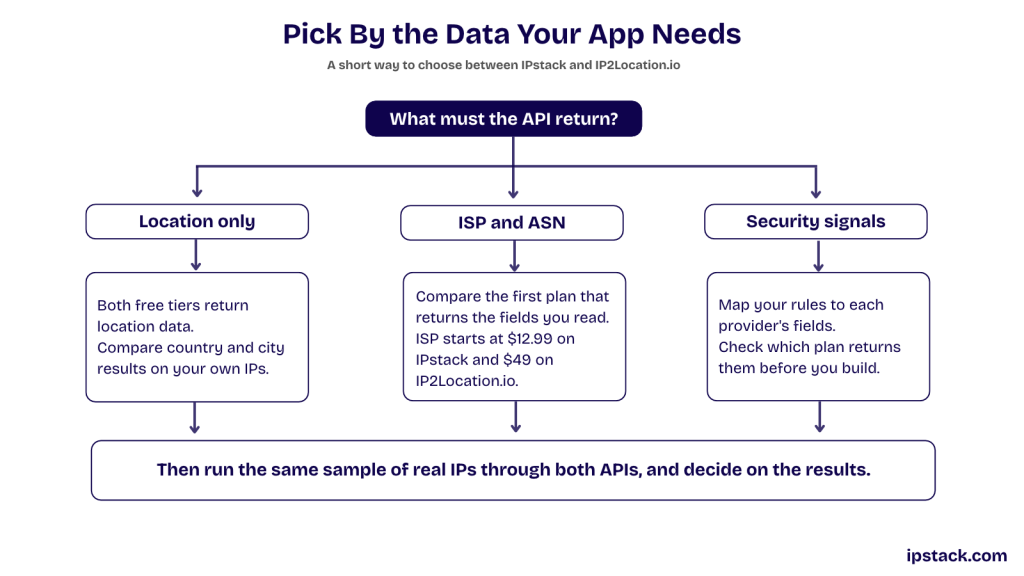
Choose ipstack when you want one hosted API (an ip2location alternative for API-first teams)
- You want location, time zone (Olson ID), currency and ASN and ISP from one call, starting at $12.99 a month.
- You want proxy, Tor, crawler and threat signals bundled with high volume (Professional Plus, 2 million requests).
- You don’t want to run a database update pipeline.
- You need HTTPS on every plan, a fields filter, JSONP callbacks or XML output.
Choose IP2Location when you need a database or extra fields
- You must run lookups offline, in an air-gapped network, or inside your own infrastructure.
- You need fields such as usage type, elevation, weather station, MCC and MNC, district or ad category.
- You need a large free API quota (50,000 a month with attribution), or a free LITE database for a prototype.
- You want a fraud score field from the same vendor (IP2Location.io Security plan).
What are the downsides of ipstack?
ipstack has no downloadable database, so every lookup is a network call. Its Free plan is limited to 100 requests a month with location data only, and the bulk endpoint and Security Module are only on Professional Plus. If you need offline lookups or a large free quota, IP2Location is the better fit.
How to Test Both on Your Own Traffic
Published figures can’t tell you how either provider performs on your users, but a short test on your own traffic can. To make it a repeatable ip geolocation api comparison, score both providers the same way:
- Build a sample of 200 to 500 IPs from your logs where you know the truth, such as billing country, verified city, or known VPN and office IPs. Include home, office, mobile, cloud and IPv6 addresses.
- Query both providers with the same IPs on the same day, and store the raw responses.
- Score country match, region and city match, empty or null rates, and agreement on ASN and proxy flags.
- Measure latency (p50 and p95) from the region where your servers run.
- Price your real monthly volume on each published plan.
Weight the scores by what your application needs. An online store that sets currency by country needs accurate country data. A delivery tool that shows nearby depots needs city-level results.
ipstack’s Free plan (100 requests a month, location only) covers a small country and city test. Testing connection or security fields needs Basic or Professional Plus. IP2Location.io’s Free plan covers 50,000 queries.
What is the most accurate IP geolocation API?
There’s no single answer, because accuracy depends on the IP ranges in your traffic. Providers publish their own figures, which aren’t independently verified. The reliable way to choose is to run the test above on your own IPs and compare country and city match rates.
Migrating from IP2Location to ipstack
If you decide to switch, most fields map directly:
IP2Location.io field | ipstack field |
country_code | country_code |
region_name | region_name |
city_name | city |
zip_code | zip |
latitude, longitude | latitude, longitude |
time_zone (offset string) | time_zone.gmt_offset (seconds) or time_zone.id |
asn (string) | connection.asn (integer) |
isp | connection.isp |
is_proxy | security.is_proxy (Professional Plus, security=1) |
You can test a lookup with cURL. This request asks for the location, time zone and connection fields the wrapper below uses:
curl "https://api.ipstack.com/134.201.250.155?access_key=YOUR_ACCESS_KEY&fields=country_code,region_name,city,zip,time_zone,connection"
On a paid plan, this returns the location fields plus the time_zone and connection objects. On the Free plan, time_zone and connection aren’t included and the request returns error 301.
To make the switch a config change, wrap both providers in one function that returns the same internal shape:
					import os
import requests


def parse_utc_offset(offset):
    if not offset or offset[0] not in "+-":
        return None

    try:
        hours, minutes = map(int, offset[1:].split(":"))
        sign = 1 if offset[0] == "+" else -1
        return sign * (hours * 3600 + minutes * 60)
    except (ValueError, TypeError):
        return None


def lookup_ip(ip: str, provider: str = "ipstack") -> dict:
    if provider == "ipstack":
        response = requests.get(
            f"https://api.ipstack.com/{ip}",
            params={"access_key": os.environ["IPSTACK_KEY"]},
            timeout=10,
        )
        response.raise_for_status()
        data = response.json()
        if data.get("error"):  # ipstack reports errors in the JSON body
            raise ValueError(data["error"].get("info", "ipstack request failed"))
        connection = data.get("connection") or {}
        time_zone = data.get("time_zone") or {}
        return {
            "country_code": data.get("country_code"),
            "region": data.get("region_name"),
            "city": data.get("city"),
            "zip": data.get("zip"),
            "latitude": data.get("latitude"),
            "longitude": data.get("longitude"),
            "timezone_id": time_zone.get("id"),
"utc_offset_seconds": time_zone.get("gmt_offset"),  # Olson ID such as America/Los_Angeles
            "asn": connection.get("asn"),
            "isp": connection.get("isp"),
        }

    response = requests.get(
        "https://api.ip2location.io/",
        params={"key": os.environ["IP2LOCATION_KEY"], "ip": ip},
        timeout=10,
    )
    response.raise_for_status()
    data = response.json()
    if data.get("error"):
        raise ValueError(data["error"].get("error_message", "IP2Location request failed"))
    asn = data.get("asn")    tz_info = data.get("time_zone_info") or {}
    return {
        "country_code": data.get("country_code"),
        "region": data.get("region_name"),
        "city": data.get("city_name"),
        "zip": data.get("zip_code"),
        "latitude": data.get("latitude"),
        "longitude": data.get("longitude"),
        "timezone_id": tz_info.get("olson"),
"utc_offset_seconds": (
    tz_info.get("gmt_offset")
    if tz_info.get("gmt_offset") is not None
    else parse_utc_offset(data.get("time_zone"))
),  # UTC offset such as -07:00
        "asn": int(asn) if str(asn).isdigit() else None,
        "isp": data.get("isp"),
    }
Note: The wrapper standardizes UTC offsets into seconds and returns an IANA time-zone identifier when the provider and subscription plan supply one. Missing fields remain None.
The ipstack API documentation lists every parameter, module and error code. A few tips for a smooth migration:
- Run both providers in parallel for a week and log the IPs where they disagree.
- Cache results per IP to control request volume.
- Handle error 104 (monthly limit reached) and 301 (field or module not on your plan).
- Bulk lookup takes up to 50 comma-separated IPs per call on Professional Plus, and returns error 302 above that.
- If you used an IP2Location database, replace the local file lookup with the API call and add caching.
How do I call an IP geolocation API with cURL?
Send a GET request with the IP in the path and your key as a query parameter, for example curl “https://api.ipstack.com/134.201.250.155?access_key=YOUR_ACCESS_KEY”. Add fields to trim the response, or security=1 on Professional Plus for proxy and threat data.
I inherited a codebase using a deprecated geolocation API – what’s the easiest drop-in replacement?
Pick a hosted API with similar field names, then wrap it in one function like the example above so the rest of the code doesn’t change. ipstack maps closely to most location fields, needs only an access key, and returns JSON or XML, which keeps the swap small.
Verdict: ipstack vs IP2Location
In the ipstack vs IP2Location decision, IP2Location wins if you need a self-hosted database or its extra fields, such as usage type, elevation or MCC and MNC. ipstack wins if you want a simple hosted API with time zone, currency and connection data at a low entry price, and security signals at volume. Teams often weigh ipstack as an ipinfo alternative too, for the same reasons.
To try it, get a free ipstack API key and run the test plan above on your own traffic.
Frequently asked questions
Do ipstack and IP2Location both support IPv6?
Yes. Both providers document IPv4 and IPv6 lookups. IP2Location.io accepts IPv6 addresses through the same ip parameter, ipstack lists IPv6 support in its documentation, and IP2Location’s downloadable databases come in IPv4 and IPv6 versions. Include IPv6 addresses in your own test, because coverage can differ by network.
Is ipstack a good IP2Location alternative?
Yes, for teams that want a hosted API with location, time zone, currency and connection data from the Basic plan at $12.99 a month. If you need a self-hosted database, offline lookups or a larger free quota, IP2Location is the better fit.
Does IP2Location have a free API?
Yes. IP2Location.io’s Free plan gives you 50,000 geolocation queries a month, with attribution required and no overage, so lookups stop when the quota runs out. A call without a key is limited to 1,000 queries a day. Check the pricing page for the current quota before you rely on it.
Is the IP2Location LITE database free for commercial use?
Yes, with attribution. IP2Location says LITE is free for personal or commercial use as long as you credit it, and describes its accuracy as limited (IP2Location LITE). Its blog states that LITE uses the Creative Commons Attribution-ShareAlike 4.0 licence, so check the share-alike terms before you ship it.
Which ipstack plan includes proxy and VPN detection?
The Security Module is on Professional Plus, at $99.99 a month for 2,000,000 requests. Add security=1 to your request to get fields such as is_proxy, is_tor, vpn_service and threat_level. Calling it on a lower plan, or without security=1, returns error 301.
Does ipstack offer a downloadable database?
No. ipstack is a hosted API with standard, bulk and requester lookup endpoints, so every lookup is a network call. If you need lower latency, cache results per IP on your side. If you need a file you can host yourself, IP2Location’s downloadable databases are built for that.
Try ipstack free
IP-to-location, ASN, ISP, time zone and threat data from one endpoint. Get a key and make your first call in under a minute.

Karam Alsalhani
All articles by Karam →